Make the selected Cat Shower reference
Choose the photos for your selected template, complete checkout, then download the finished MP4 after generation; the steps below explain what to prepare.
- Preview the selected scene. The bathroom and bedroom are two parts of one prepared sequence; the same uploaded subject is tracked across the cut.
- Assign your photos. One clear animal photo per selected role; show the face, ears, coat markings and body. Follow the numbered reference roles.
- Review the price and generate. $10.99 for this selected version before applicable tax. One-time payment. No monthly subscription.
- Review and download. Inspect the generated identity, motion and sound before sharing the MP4.
Which Cat Shower scene is prepared?
The bathroom and bedroom are two parts of one prepared sequence; the same uploaded subject is tracked across the cut.
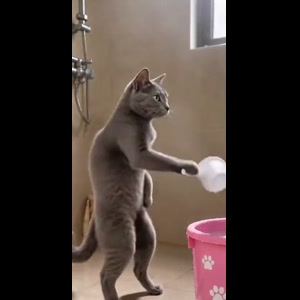
The selected reference shows an upright cat pretending to pour water in a bathroom before escaping to bed. Cup and bath bucket → The fake wash continues → The cat walks out and heads for bed. These are observations of the displayed reference, not a claim about search volume or how often people use the trend.
Watch the complete preview and match it to the version you want. It is an effect reference, not a customer result generated on Memelry. A new result is made from your uploaded photos and can differ from the reference.
How do the Cat Shower photo roles work?
This version has 1 customizable role. Photo 1: the upright cat holding the cup and later jumping onto the bed.
One clear animal photo per selected role; show the face, ears, coat markings and body.
Use the reference screenshots above the upload form to identify the intended role. The uploaded photo supplies the appearance; it does not choose new camera positions, a new background or a different ending.
When would I edit existing footage instead?
If you have already recorded the action and only want cuts, captions or sound editing, use an editor for that footage. This prepared tool generates a new AI recreation from assigned photos.
A new background, story, cast size or ending is a different request. Check the selected reference and available photo roles before ordering.
How do I compare appearance and movement?
Use clear photos with the intended appearance visible. Follow the numbered reference screenshots to keep roles assigned across cuts. AI can alter details, so inspect the full result before posting.
This page does not claim that a particular model is the most realistic or that different tools were tested with matched inputs.
What does the individual purchase include?
Approximately 11 seconds, 720p, 9:16 MP4, including the prepared reference recording.
$10.99 before applicable tax. One-time payment. No monthly subscription. Existing credits remain usable through the credit entry in the form; this version uses 11 credits.
The delivered MP4 has no platform watermark, no Memelry watermark and no automatic ending card. The preview is the source reference, not a free personalized result made from your photos.
Generation failures return used generation credits. Payment refunds follow the Refund Policy; a returned credit is separate from money returned to your payment method.
Choose the workflow for your result
The table below summarizes the details for this page, so you can compare the listed options and check their differences before choosing your approach.
| Your goal | This prepared version | Another workflow |
|---|---|---|
| Make the scene shown here | an upright cat pretending to pour water in a bathroom before escaping to bed | A different prepared template if the reference does not match |
| Assign identities | Photo 1: the upright cat holding the cup and later jumping onto the bed. | Check the selected tool’s actual role controls |
| Edit recorded footage | Creates a new AI recreation from photos | Edit your footage in a timeline |
| Create a new scene or script | Uses the displayed reference and recording | A separate scene-generation/audio/editing workflow |
| Download | Approximately 11 seconds, 720p, 9:16 MP4, including the prepared reference recording. $10.99 before applicable tax. One-time payment. No monthly subscription. | Check that tool’s own export settings and payment terms |
| Watermark / outro | No platform or Memelry watermark; no automatic ending card | Depends on the chosen tool |
Where can you check the original videos and sources?
The linked Memelry template shows its selected reference, photo roles and specifications. This comparison describes editing workflows without claiming a matched quality test.
Last checked .