Skip to content

Make the Jingle Bell Brazil video from your photos

Make the Jingle Bell Brazil dance from your photos using Memelry’s prepared 15-second blue-room trio template with Santa hats, glowing gloves and reference audio. Upload one required photo for the center dancer and optionally add separate photos for the left and right dancers. The 720p vertical MP4 costs $14.99 before applicable tax. One-time payment. No monthly subscription.

Choose photos and make this video

$14.99 for this prepared version before applicable tax. One-time payment. No monthly subscription.

See the phone-photo step-by-step guide

Match the reference roles to your photos

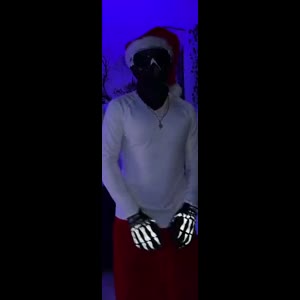
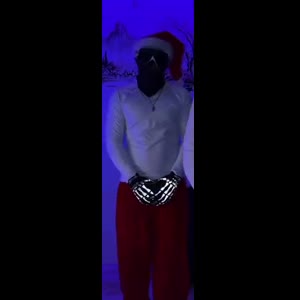
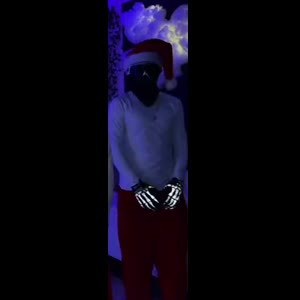
These are screenshots from the selected preview, not customer photos. The numbers match the upload slots below; use your own photos for the final appearance.

Photo 1: The front-center dancer
Photo 2: The rear dancer on the viewer’s left
Photo 3: The rear dancer on the viewer’s right

One clear photo per person, face visible. Only photo 1 is required; anyone without a photo stays as in the original clip. JPG, PNG or WebP, up to 10 MB each.

Already have credits?

This video uses 15 credits. Sign in with your checkout email to use your balance.

No account needed: pay $14.99 once and your video starts. Signed in with credits? It uses 15 credits instead.

Already paid? Use your checkout email to recover your credits. Sign in to use your credits.

Generation failures and moderation refusals return the used generation credits automatically. A credit return is separate from a refund to your payment card. Refund policy

Photo requirements

  • Use: One person or one pet, alone in the photo
  • Use: Face clear and facing the camera
  • Use: Even light, sharp, no heavy filters
  • Avoid: Group photos, tiny or cut-off faces
  • Avoid: Sunglasses, masks or hands over the face
  • Avoid: Anyone under 18

JPG, PNG or WebP, up to 10 MB. Uploaded photos are stored to provide the service. Delete your account or contact support to request deletion.

Output
Length
about 15 seconds
Quality
720p (720×1280)
Model
Seedance 2.5
Format
9:16 vertical MP4
Sound
The original clip's sound
Ready in
5–10 minutes
Cost
$14.99 per video, or 15 credits if you have a pack

Effect reference (not a Memelry-generated result)

15s · 720p · 9:16 vertical · MP4 with the original sound

Who would you put in this video?

Send this template to a friend and choose your roles. The link shares this public page.

Make your Jingle Bell Brazil video

Watch the selected reference and match the numbered roles before uploading. The steps below cover photo preparation, the one-time purchase or existing-credit route, and saving your delivered video.

  1. Confirm the blue-room trio version. Watch the 15-second masked-trio reference with Santa hats and glowing gloves. Check that it is the choreography you want.
  2. Prepare portraits, including crops from a group photo. Use one clear person per photo. If starting with a group photo, save separate portrait crops first. Choose JPG, PNG or WebP up to 10 MB each.
  3. Cast the center, left and right dancers. Photo 1 casts the center dancer, photo 2 viewer-left and photo 3 viewer-right. Empty optional roles retain the source dancer; they do not remove anyone.
  4. Review the price and start. $14.99 before applicable tax. One-time payment. No monthly subscription. Checkout buys this prepared video; the existing-credit entry uses 15 credits.
  5. Download and review the MP4. Save the approximately 15-second, 720p vertical MP4 with reference audio. Check faces, hands and timing. The delivered file has no platform or Memelry watermark or automatic outro.

Where does this format come from, and what is the joke?

The source caption says “JINGLE BELL x BRAZIL” and the sound metadata names JINGLE BELL ROCK BRAZIL DJ PAUL BIGATA V.2. The seasonal costume and Brazilian dance beat explain the combination. This is separate from the Mean Girls Christmas choreography.

Which Jingle Bell Brazil scene is prepared?

This is the blue-room trio version, not Mean Girls Jingle Bell Rock. Source dancers wear masks; assigned faces should be visible in the generated result, but likeness is not guaranteed.

Check the choreography as well as the song title: this prepared clip is the 15-second masked trio in a blue-lit room. An 11-second solo dance, the Mean Girls Christmas routine or another Jingle Bell remix is a different reference; changing your photos does not switch to it.

The selected reference shows a trio Christmas dance in a blue-lit room with Santa hats and glowing gloves. The trio wait in formation → The crossed-arm and hand-to-mouth accents → The synchronized arm rolls and bouncing steps. These are observations of the displayed reference, not a claim about search volume or how often people use the trend.

Watch the complete preview and match it to the version you want. It is an effect reference, not a customer result generated on Memelry. A new result is made from your uploaded photos and can differ from the reference.

How do the Jingle Bell Brazil photo roles work?

This version has 3 customizable roles. Photo 1: the front-center dancer; Photo 2: the rear dancer on the viewer’s left; Photo 3: the rear dancer on the viewer’s right.

One clear adult per photo; face and intended outfit visible, even light and no heavy filter.

Use the reference screenshots above the upload form to identify the intended role. The uploaded photo supplies the appearance; it does not choose new camera positions, a new background or a different ending.

Photo 1 is required. Photo 2 and photo 3 are optional: leaving a slot empty keeps that source dancer in the scene. Uploading two portraits still makes the three-person scene, with one reference dancer retained.

What does one Jingle Bell Brazil video purchase include?

The configured output is about 15 seconds at 720p in 9:16 framing, delivered as an MP4. The prepared reference audio is included.

The price is $14.99 before any applicable tax. One-time payment. No monthly subscription. You buy this selected video, rather than a recurring plan. Existing credits can still be used through the credit entry on the form. This version uses 15 existing credits.

Generation usually takes 5–10 minutes and can vary with the queue. The target settings describe the prepared generation, not a measured accuracy benchmark. Review the generated appearance and movement before posting. Failed generations return their generation credits; cash refunds follow the Refund Policy.

Can I make this video on my phone and save the result?

Use the numbered upload areas in your phone browser to choose JPG, PNG or WebP photos up to 10 MB each. If an HEIC file is rejected, export a JPG/PNG copy or choose a clear screenshot. Check the selected image before continuing.

The normal creation action opens checkout when payment is needed. Already purchased credits remain usable through “Use credits to make this video” in the form. After checkout, return to the progress or delivery page; generation usually takes 5–10 minutes and can vary with the queue.

Download the finished MP4 from the result or delivery page. On a phone, use the browser’s download or share controls to save it to Files or your photo library where supported. To recover a delivered result, sign in with the checkout email and open My history.

Does the delivered video have a watermark or an automatic outro?

The delivered video has no platform watermark, no Memelry watermark and no automatic ending card. The clip on this page is the source reference, not a personalized video already made from your photos. Generating your version is a separate paid step.

Can I make Jingle Bell Brazil from one group photo?

If your friends are in one group photo, first crop and save one separate portrait per person using your phone’s photo editor. Keep each face sharp and include enough of the intended outfit. Upload the separate crops into the numbered roles: photo 1 center, photo 2 viewer-left, photo 3 viewer-right.

The current form assigns one uploaded image to each selected role. This workflow uses your saved crops; you do not need to photograph everyone together again or record a dance. Check that each crop shows the intended person before paying.

How should I judge face likeness in the masked-trio version?

The source dancers wear masks. Use clear, unmasked portrait photos for the identities you want to create, and inspect the resulting faces and costume details rather than treating the masked source preview as a likeness sample.

Review the generated identity, hands or paws, clothing or coat markings, and movement before sharing. AI can change details. We have not run a controlled comparison establishing which tool is the most realistic, and exact likeness is not guaranteed.

Jingle Bell Brazil version at a glance

The table below summarizes the details for this page, so you can compare the listed options and check their differences before choosing your approach.

Check before payingPrepared version
Reference scenea trio Christmas dance in a blue-lit room with Santa hats and glowing gloves
Photo roles1 required photo and 2 optional role photos
DurationAbout 15 seconds
Target file720p · 9:16 · MP4
SoundPrepared reference audio
Watermark / outroNo platform or Memelry watermark; no automatic ending card
Existing credits15 credits through the credit entry on the form
Payment$14.99 before applicable tax. One-time payment. No monthly subscription.

Where can you check the original videos and sources?

The sources linked below document the selected reference clips and their context; template examples show reference footage unless explicitly labeled as generated results.

Last checked .

What else do people ask about Jingle Bell Brazil?

People ask about photos, performer choices, payment, music and downloads; the answers below explain the available options and requirements for the page you are viewing.

+How many photos does the Jingle Bell Brazil video need?

Photo 1 is required for the center dancer. Photos 2 and 3 are optional for the viewer-left and viewer-right dancers. Use one separate portrait per role. Empty optional slots retain their source dancers, so the output still has three dancers.

+Is Jingle Bell Brazil a one-time payment or a subscription?

This version costs $14.99 before any applicable tax. One-time payment. No monthly subscription. The checkout shows the current total before payment; you do not need to buy a monthly plan.

+Does the Jingle Bell Brazil video include sound?

Yes. This version uses the prepared reference clip’s audio. It does not offer a replacement song, new dialogue or a custom lip-sync recording. Check any permissions needed before publishing the sound.

+Which Jingle Bell Brazil version does this page make?

This is the blue-room trio version, not Mean Girls Jingle Bell Rock. Source dancers wear masks; assigned faces should be visible in the generated result, but likeness is not guaranteed. Preview the selected clip before paying; a different scene or choreography is not selected by changing the photo.

+Will the Jingle Bell Brazil result match my photo exactly?

The photo supplies the intended identity and appearance while the reference supplies the motion and composition. AI can change facial details, hands, clothing or movement, so exact likeness and frame-by-frame accuracy are not guaranteed. Review the result before sharing.

+Which AI tool can turn a group photo into a Jingle Bell Brazil video?

You can use a group photo by first saving a separate portrait crop of each person, then uploading those files into Memelry’s numbered roles. Photo 1 is the center dancer, photo 2 is viewer-left and photo 3 is viewer-right. The form uses separate photo slots. Blank optional slots retain their source dancers, so fewer uploads do not turn this trio into a solo or duo scene.

+Which AI tool makes the most realistic Jingle Bell Brazil videos?

Compare the actual reference version first: this page makes the 15-second blue-room masked trio. Supply clear, unmasked photos with the intended appearance, then inspect faces, hands and costume details in the result. Review the generated identity, hands or paws, clothing or coat markings, and movement before sharing. AI can change details. We have not run a controlled comparison establishing which tool is the most realistic, and exact likeness is not guaranteed.

+Which AI app already has a Jingle Bell Brazil trend template?

Memelry has a ready-made Jingle Bell Brazil template embedded on this page: the blue-lit three-dancer scene with Santa hats, glowing gloves and the prepared reference audio. It makes an approximately 15-second, 720p vertical MP4 for $14.99 before tax. One-time payment. No monthly subscription. Watch the preview to confirm this choreography.

+What AI app can I use to make the Jingle Bell Brazil trend with my own photos?

Use the Memelry tool here in your browser with one required photo and up to two optional photos. Each photo casts one dancer: center, viewer-left, viewer-right. Empty optional slots keep their reference dancers. The prepared video includes reference audio and costs $14.99 before tax, or 15 existing credits. One-time payment. No monthly subscription.

+What's the easiest AI tool for beginners to make the Jingle Bell Brazil trend?

For a beginner, this page already supplies the dance reference and audio. Match the numbered role screenshots, select the portraits, review the price, start the selected video and download the MP4 when it is delivered. You do not need to learn the steps, film the dance or synchronize the music yourself. The source preview is not a free personalized result.

+Does the delivered video have a watermark or an automatic outro?

The delivered video has no platform watermark, no Memelry watermark and no automatic ending card. The clip on this page is the source reference, not a personalized video already made from your photos. Generating your version is a separate paid step.

+How do I download or recover my video on my phone?

Download the finished MP4 from the result or delivery page. On a phone, use the browser’s download or share controls to save it to Files or your photo library where supported. To recover a delivered result, sign in with the checkout email and open My history.

+Is the preview already generated from my photos?

No. The displayed clip is the prepared source reference and the crops identify the upload roles. It is not your personalized output. Your result is generated after starting the paid video or using existing credits.

Can't find your meme? Paste the TikTok link →Send any meme video and your photos; we put your faces and clothes into it.