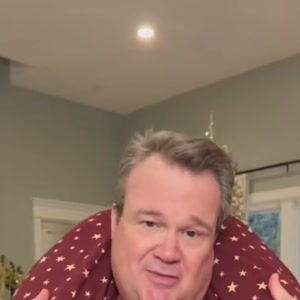

Make your Shoulder Carry / I’m the One video
Choose the photos for your selected template, complete checkout, then download the finished MP4 after generation; the steps below explain what to prepare.
- Watch the prepared reference. Confirm the scene, role order, framing and original audio in the playable preview. It is the creator’s reference, not a personalized result.
- Choose and assign the photos. Photo 1 casts the opening carrier. Optional photo 2 casts the carried partner who comes forward at the end. An empty optional slot keeps that reference performer. Choose clear JPG, PNG or WebP files up to 10 MB.
- Review the one-time price and start. $9.99 before applicable tax. One-time payment. No monthly subscription. Use checkout for this selected video or the existing-credit entry for 10 credits.
- Download and review. Download the approximately 9-second, 720p 9:16 MP4 after processing. Review identity, hands and motion before sharing. Recover a delivered result through My history using the checkout email.
What is the Shoulder Carry / I’m the One trend?
One partner starts across the other person’s shoulders. After a turn and bend, the carried partner comes forward and owns the camera, mouthing the hook and pointing. The apparent change in who is in charge is the visual joke, which works for couples, friends and other recognizable pairs.
TikTok captions use Shoulder Carry, I’m the One, Famous I’m the One and #shouldercarrytrend. This is an existing couple format with ongoing character-remake versions; the Christmas-room setting is a version of that format, not a claim that the whole trend began today.
Which shoulder carry reference does this page use?
This prepared clip is the roughly 9-second Christmas-room version shared by Capcut Templates Daily: two performers in patterned festive pajamas, a decorated tree, the turn and shoulder flip, then a close-up of the carried partner.
It is separate from the underground-car-park reference used in other Shoulder Carry posts. Changing your photos does not switch the room or select a different version. The reference shows the selected scene, not a customer result made on Memelry.
Who do photo 1 and photo 2 replace?
Photo 1 replaces the grey-haired opening carrier, who faces the lens first and then turns and bends forward. Photo 2 replaces the red-haired carried partner, who begins across the shoulders and ends facing the camera in the closing close-up.
Keep the same photo assigned to the same person through the turn. The role order follows those people, even when the person nearest the lens changes. Use the actual reference crops beside the upload roles to identify them.
Photo 1 is required; photo 2 is optional. Leaving photo 2 empty keeps that reference performer. One uploaded photo does not turn this into a one-person scene or remove the partner.
Which photos help with the shoulder carry flip?
Choose one consenting adult per photo, with the face, hair, body build and intended outfit visible. Separate waist-up or full-body photos provide useful information for the carrying pose and turn. If starting from a group picture, save one clear portrait crop per person before upload.
The prepared video follows the reference action; your photos supply appearance and clothes. It does not automatically put everyone into the source pajamas. The shoulder overlap and turning faces can be difficult for AI, so check both identities, arms and body positions in the finished result.
Which I’m the One sound is included?
The result uses the prepared audio from the displayed reference. The selected post labels it as original sound. A checked football remake of the same format identifies «Famous (I’m the One)» by Mozzy & Iamsu!; song-title matches alone do not identify a specific video version.
Watch this reference with sound before paying. The form does not offer a different song, new dialogue or custom lip-sync recording. Review any permissions needed before sharing the sound.
Can I make this from photos on my phone?
Open the embedded tool in your phone browser and tap the numbered upload areas to choose from your photo or file picker. The form accepts JPG, PNG and WebP up to 10 MB per image. If an HEIC file is rejected, export a JPG/PNG copy or use a clear screenshot.
The normal creation action opens checkout when payment is needed. If you already have credits, use “Use credits to make this video” in the form. This version uses 10 existing credits.
After generation, download the MP4 from the result or delivery page and use your browser’s save or share controls. Sign in with the checkout email and open My history if you need to recover the delivered result.
What does the one-time purchase include?
The configured result is approximately 9 seconds at 720p in 9:16 framing, as an MP4 with the prepared reference audio. The price is $9.99 before applicable tax. One-time payment. No monthly subscription.
Delivered videos have no platform or Memelry watermark and no automatic ending card. Watermark-free delivery does not mean generation is free, and the displayed reference is not a free personalized generation.
Generation usually takes 5–10 minutes and can vary with the queue. AI can change facial details, hands, clothes and motion; exact likeness and a quality ranking over other tools are not guaranteed. Failed generations return generation credits; card refunds follow the Refund Policy.
Check this prepared version before paying
The table below summarizes the details for this page, so you can compare the listed options and check their differences before choosing your approach.
| Detail | Selected version |
|---|---|
| Scene | the two-person Christmas-room shoulder carry and flip, followed by the carried partner leaning into the camera |
| Photo roles | 1 required photo and 1 optional role photo |
| Duration | About 9 seconds |
| Target file | 720p · 9:16 · MP4 |
| Sound | Prepared reference audio |
| Watermark / outro | No platform or Memelry watermark; no automatic ending card |
| Existing credits | 10 credits through the form’s credit entry |
| Price | $9.99 before applicable tax. One-time payment. No monthly subscription. |
Where can you check the original videos and sources?
The sources linked below document the selected reference clips and their context; template examples show reference footage unless explicitly labeled as generated results.
Last checked .