Skip to content

Dropped Truck GTA 6 AI

Put your truck in the “How yall gonna see me rolling in GTA 6” edit. One photo supplies the vehicle for the helicopter opening, the smoky turn and the close wheel pass. Download a 10-second landscape MP4 with the reference sound. $9.99 before applicable tax. One-time payment. No monthly subscription.

Choose your truck photo

$9.99 before applicable tax. One-time payment. No monthly subscription.

Match the reference roles to your photos

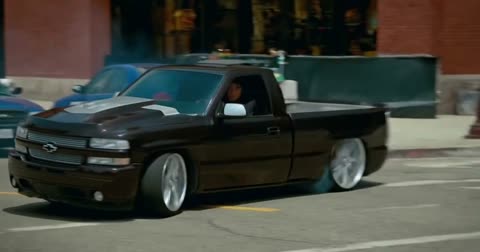
These are screenshots from the selected preview, not customer photos. The numbers match the upload slots below; use your own photos for the final appearance.

Your truck or car
Your truck or car

Already have credits?

This video uses 10 credits. Sign in with your checkout email to use your balance.

No account needed: pay $9.99 once and your video starts. Signed in with credits? It uses 10 credits instead.

Already paid? Use your checkout email to recover your credits. Sign in to use your credits.

Generation failures and moderation refusals return the used generation credits automatically. A credit return is separate from a refund to your payment card. Refund policy

Photo requirements

  • Use: One vehicle, fully visible
  • Use: Clear front three-quarter view showing body and wheels
  • Use: Even light, sharp, no heavy filters
  • Avoid: Several cars or a cropped vehicle
  • Avoid: Covered bodywork or heavy reflections
  • Avoid: Tiny, blurry or heavily filtered photos

JPG, PNG or WebP, up to 10 MB. Uploaded photos are stored to provide the service. Delete your account or contact support to request deletion.

Output
Length
about 10 seconds
Quality
720p (1280×720)
Model
Seedance 2.5
Format
16:9 horizontal MP4
Sound
The original clip's sound
Ready in
5–10 minutes
Cost
$9.99 per video, or 10 credits if you have a pack

Effect reference (not a Memelry-generated result)

10s · 720p · 16:9 horizontal · MP4 with the original sound

Who would you put in this video?

Send this template to a friend and choose your roles. The link shares this public page.

Make the truck edit from a photo

Choose the photos for your selected template, complete checkout, then download the finished MP4 after generation; the steps below explain what to prepare.

  1. Preview the burnout. Play the reference to see the opening street view, the smoky turn and the close pass.
  2. Upload one vehicle photo. Choose a JPG, PNG or WebP showing the entire truck or car. Use a photo you have permission to use.
  3. Generate and download. Continue to checkout for the selected video, or use your existing credits. When generation finishes, download the MP4.

The truck under the helicopter

In the TikTok clip by @1low_hd, a dark lowered pickup looks ready for an ordinary cruise until the camera pulls back, the rear swings out and tire smoke fills the lane. The edit cuts from a broad street view to the grille, wheels and tailgate. The caption imagines how the owner would roll through GTA 6.

Give the camera enough truck to work with

Photograph the truck from a front corner with the bumper, cab, bed and wheels inside the frame. That angle supplies both a front and a side view for the turn. A wheel close-up leaves the generator to infer the rest of the body.

The photo controls the vehicle’s appearance. The prepared clip supplies the downtown setting, traffic and camera moves. Small lettering, badges and details hidden on the far side can vary.

Where can you check the original videos and sources?

The sources linked below document the selected reference clips and their context; template examples show reference footage unless explicitly labeled as generated results.

Last checked .

What else do people ask about Dropped Truck GTA 6 AI?

People ask about photos, performer choices, payment, music and downloads; the answers below explain the available options and requirements for the page you are viewing.

+Do I upload a picture of the driver or the truck?

Upload the vehicle. Its paint, body shape and wheels are the visual reference throughout the edit.

+Can I make the edit with a car instead of a pickup?

Yes. Use a clear photo of one car. It takes the foreground vehicle’s place and follows the pickup’s driving sequence.

+Does this change my vehicle in GTA 6?

You receive a standalone AI video in MP4 format. You can make it without a game account or gameplay capture.

+What is included in the $9.99 price?

One 10-second, 720p landscape video with the prepared reference sound, before applicable tax. One-time payment. No monthly subscription.

Can't find your meme? Paste the TikTok link →Send any meme video and your photos; we put your faces and clothes into it.