Skip to content

Make the Raccoon and Cat Paparazzi video from your photos

Use the prepared Raccoon and Cat Paparazzi template to recreate the palm-lined sidewalk paparazzi strut with a cat and a bucket-hat raccoon from up to 2 separate photos. The configured result is an approximately 11-second MP4 with the prepared reference audio, for $10.99 before any applicable tax. One-time payment. No monthly subscription.

Choose photos and make this video

$10.99 for this prepared version before applicable tax. One-time payment. No monthly subscription.

Raccoon and Cat Paparazzi From Your Pet Photos

Match the reference roles to your photos

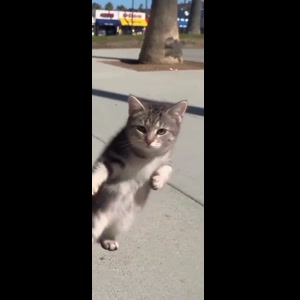
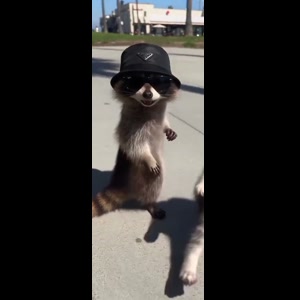
These are screenshots from the selected preview, not customer photos. The numbers match the upload slots below; use your own photos for the final appearance.

Photo 1: Cat’s role
Photo 1: Cat’s role
Photo 2: Raccoon’s role

One adult or one pet per photo, face clearly visible. Dogs, cats, two pets, or a person and a pet can take the two roles. Photo 1 is required; photo 2 is optional. Empty slots keep the original performer. For pets, show the ears, coat markings and upper body. JPG, PNG or WebP, up to 10 MB each.

Already have credits?

This video uses 11 credits. Sign in with your checkout email to use your balance.

No account needed: pay $10.99 once and your video starts. Signed in with credits? It uses 11 credits instead.

Already paid? Use your checkout email to recover your credits. Sign in to use your credits.

Generation failures and moderation refusals return the used generation credits automatically. A credit return is separate from a refund to your payment card. Refund policy

Photo requirements

  • Use: One person or one pet, alone in the photo
  • Use: Face clear and facing the camera
  • Use: Even light, sharp, no heavy filters
  • Avoid: Group photos, tiny or cut-off faces
  • Avoid: Sunglasses, masks or hands over the face
  • Avoid: Anyone under 18

JPG, PNG or WebP, up to 10 MB. Uploaded photos are stored to provide the service. Delete your account or contact support to request deletion.

Output
Length
about 11 seconds
Quality
720p (720×1280)
Model
Seedance 2.5
Format
9:16 vertical MP4
Sound
The original clip's sound
Ready in
5–10 minutes
Cost
$10.99 per video, or 11 credits if you have a pack

Effect reference (not a Memelry-generated result)

11s · 720p · 9:16 vertical · MP4 with the original sound

Who would you put in this video?

Send this template to a friend and choose your roles. The link shares this public page.

Make your Raccoon and Cat Paparazzi video

Choose the photos for your selected template, complete checkout, then download the finished MP4 after generation; the steps below explain what to prepare.

  1. Preview the selected scene. The first photo casts the cat’s role; the optional second photo casts the raccoon’s role. Leave slot 2 blank to retain the bucket-hat raccoon from the reference.
  2. Assign your photos. One clear animal photo per selected role; show the face, ears, coat markings and body. Follow the numbered reference roles.
  3. Review the price and generate. $10.99 for this selected version before applicable tax. One-time payment. No monthly subscription.
  4. Review and download. Inspect the generated identity, motion and sound before sharing the MP4.

Which Raccoon and Cat Paparazzi scene is prepared?

The first photo casts the cat’s role; the optional second photo casts the raccoon’s role. Leave slot 2 blank to retain the bucket-hat raccoon from the reference.

The selected reference shows the palm-lined sidewalk paparazzi strut with a cat and a bucket-hat raccoon. The pair approach the camera → The raccoon pushes a paw toward the lens → The pet close-up and walk-off. These are observations of the displayed reference, not a claim about search volume or how often people use the trend.

Watch the complete preview and match it to the version you want. It is an effect reference, not a customer result generated on Memelry. A new result is made from your uploaded photos and can differ from the reference.

How do the Raccoon and Cat Paparazzi photo roles work?

This version has 2 customizable roles. Photo 1: the cat starting on the viewer’s right; Photo 2: the bucket-hat raccoon starting on the viewer’s left.

One clear animal photo per selected role; show the face, ears, coat markings and body.

Use the reference screenshots above the upload form to identify the intended role. The uploaded photo supplies the appearance; it does not choose new camera positions, a new background or a different ending.

What does one Raccoon and Cat Paparazzi video purchase include?

The configured output is about 11 seconds at 720p in 9:16 framing, delivered as an MP4. The prepared reference audio is included.

The price is $10.99 before any applicable tax. One-time payment. No monthly subscription. You buy this selected video, rather than a recurring plan. Existing credits can still be used through the credit entry on the form.

Generation usually takes 5–10 minutes and can vary with the queue. The target settings describe the prepared generation, not a measured accuracy benchmark. Review the generated appearance and movement before posting. Failed generations return their generation credits; cash refunds follow the Refund Policy.

Cast the cat and raccoon roles separately

Photo 1 fills the cat role starting on the viewer’s right. Photo 2 fills the bucket-hat raccoon role starting on the viewer’s left. Use a separate clear pet photo for each role you want changed.

Only photo 1 is required. Leave photo 2 blank to retain the reference raccoon; uploading only the cat does not remove its walking partner. A group pet photo is not automatically split between the two roles.

What photo detail matters during the paparazzi strut?

Show the face, ears, coat markings and as much of the body as possible. Good light helps distinguish fur colors; avoid motion blur, tiny faces and overlapping pets.

The palm-lined sidewalk and walking performance come from the reference. Review face shape, markings and paws through the strut. Exact pet identity and movement are not guaranteed.

Can I make and save this video on my phone?

Open this page in your phone browser and use the numbered photo pickers. Choose JPG, PNG or WebP files up to 10 MB each. If an HEIC file is rejected, export a JPG/PNG copy or select a clear screenshot. Check that the face, pet markings or car details remain sharp.

After delivery, download the MP4 from the result page. On a phone, use the browser’s download or share controls to save the file. To recover a delivered result, sign in with the checkout email and open My history.

Does the download have a watermark or an automatic ending?

The delivered MP4 has no platform watermark, no Memelry watermark and no automatic ending card. The displayed video is the prepared source reference, not a personalized preview already generated from your photos.

What should I check before paying for this prepared version?

This prepared version costs $10.99 before applicable tax. One-time payment. No monthly subscription. Existing purchased credits remain usable through “Use credits to make this video” in the form; this version uses 11 credits. Checkout shows the final tax-inclusive total before payment.

Approximately 11 seconds, 720p, 9:16 MP4, with the prepared reference audio.

Generation failures return the used generation credits. A credit return is separate from a refund to your payment method; payment refunds follow the Refund Policy.

Raccoon and Cat Paparazzi version at a glance

The table below summarizes the details for this page, so you can compare the listed options and check their differences before choosing your approach.

Check before payingPrepared version
Reference scenethe palm-lined sidewalk paparazzi strut with a cat and a bucket-hat raccoon
Photo roles1 required photo and 1 optional role photo
DurationAbout 11 seconds
Target file720p · 9:16 · MP4
SoundPrepared reference audio
Payment$10.99 before applicable tax. One-time payment. No monthly subscription.
Watermark / outroNo platform or Memelry watermark; no automatic ending card
Existing credits11 through the credit entry in the form

Last checked .

What else do people ask about Raccoon and Cat Paparazzi?

People ask about photos, performer choices, payment, music and downloads; the answers below explain the available options and requirements for the page you are viewing.

+How many photos does the Raccoon and Cat Paparazzi video need?

This prepared version has 1 required photo and 1 optional role photo. Use one subject per photo and match the numbered reference screenshots. Empty optional slots retain their reference characters. The first photo casts the cat’s role; the optional second photo casts the raccoon’s role. Leave slot 2 blank to retain the bucket-hat raccoon from the reference.

+Is Raccoon and Cat Paparazzi a one-time payment or a subscription?

This version costs $10.99 before any applicable tax. One-time payment. No monthly subscription. The checkout shows the current total before payment; you do not need to buy a monthly plan.

+Does the Raccoon and Cat Paparazzi video include sound?

Yes. This version uses the prepared reference clip’s audio. It does not offer a replacement song, new dialogue or a custom lip-sync recording. Check any permissions needed before publishing the sound.

+Which Raccoon and Cat Paparazzi version does this page make?

The first photo casts the cat’s role; the optional second photo casts the raccoon’s role. Leave slot 2 blank to retain the bucket-hat raccoon from the reference. Preview the selected clip before paying; a different scene or choreography is not selected by changing the photo.

+Will the Raccoon and Cat Paparazzi result match my photo exactly?

The photo supplies the intended identity and appearance while the reference supplies the motion and composition. AI can change facial details, hands, clothing or movement, so exact likeness and frame-by-frame accuracy are not guaranteed. Review the result before sharing.

+Cast the cat and raccoon roles separately

Photo 1 fills the cat role starting on the viewer’s right. Photo 2 fills the bucket-hat raccoon role starting on the viewer’s left. Use a separate clear pet photo for each role you want changed. Only photo 1 is required. Leave photo 2 blank to retain the reference raccoon; uploading only the cat does not remove its walking partner. A group pet photo is not automatically split between the two roles.

+Which photos do I need for Raccoon and Cat Paparazzi?

Photo 1: the cat starting on the viewer’s right; Photo 2: the bucket-hat raccoon starting on the viewer’s left. One clear animal photo per selected role; show the face, ears, coat markings and body. Photo 1 is required. The other photo slots are optional; a blank slot retains its reference performer. Use a separate image for each role you want changed.

+How much does one Raccoon and Cat Paparazzi video cost?

This prepared version costs $10.99 before applicable tax. One-time payment. No monthly subscription. Existing purchased credits remain usable through “Use credits to make this video” in the form; this version uses 11 credits. Checkout shows the final tax-inclusive total before payment. Approximately 11 seconds, 720p, 9:16 MP4, with the prepared reference audio.

+Does the Raccoon and Cat Paparazzi download have a watermark or an outro?

The delivered MP4 has no platform watermark, no Memelry watermark and no automatic ending card. The displayed video is the prepared source reference, not a personalized preview already generated from your photos.

+Can I make and download Raccoon and Cat Paparazzi on my phone?

Open this page in your phone browser and use the numbered photo pickers. Choose JPG, PNG or WebP files up to 10 MB each. If an HEIC file is rejected, export a JPG/PNG copy or select a clear screenshot. Check that the face, pet markings or car details remain sharp. After delivery, download the MP4 from the result page. On a phone, use the browser’s download or share controls to save the file. To recover a delivered result, sign in with the checkout email and open My history.

+What photo detail matters during the paparazzi strut?

Show the face, ears, coat markings and as much of the body as possible. Good light helps distinguish fur colors; avoid motion blur, tiny faces and overlapping pets. The palm-lined sidewalk and walking performance come from the reference. Review face shape, markings and paws through the strut. Exact pet identity and movement are not guaranteed.

+Is the preview a free Raccoon and Cat Paparazzi result made with my photo?

You can watch the source reference before paying. Generating a personalized version is a paid step at the displayed price, or uses existing purchased credits. This page does not advertise a free personalized trial or free watermark-free generation.

+Does Raccoon and Cat Paparazzi include its sound?

The prepared recording comes with this version. The form does not offer a replacement song, custom dialogue or a new lip-sync recording. Including the reference sound does not guarantee perfectly synchronized generated mouths.

Can't find your meme? Paste the TikTok link →Send any meme video and your photos; we put your faces and clothes into it.