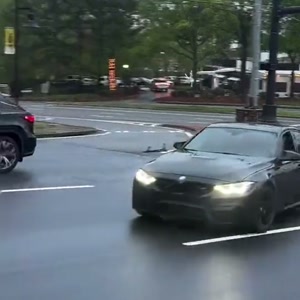
Make your Car Drift AI video
Choose the photos for your selected template, complete checkout, then download the finished MP4 after generation; the steps below explain what to prepare.
- Watch this exact reference. Confirm the scene, role, audio and framing in the embedded player. The preview is not a personalized result.
- Upload the one role photo. Use one sharp photo of the whole car from a front three-quarter angle. Include the bumper, roof, wheels and one side, with room around the body. Show the actual paint and trim in even light, with no other vehicle blocking it. JPG, PNG or WebP up to 10 MB.
- Review the one-time purchase. $14.99 before applicable tax. One-time payment. No monthly subscription. Or use 15 existing credits through the small credit entry.
- Download and inspect. About 15 seconds, 720p, 9:16 MP4 with the prepared reference recording. Review the full result; recover a delivered video in My history using your checkout email.
1. Choose the car photo on your phone
Use one sharp photo of the whole car from a front three-quarter angle. Include the bumper, roof, wheels and one side, with room around the body. Show the actual paint and trim in even light, with no other vehicle blocking it. If an HEIC file is rejected, export a JPG/PNG first.
2. Check the reference and selected purchase
Confirm the wet traffic-light intersection, close sideways pass and original recording. The subject is your car, not your face. $14.99 before applicable tax. One-time payment. No monthly subscription. The existing-credit entry uses 15 credits.
3. Save the result
Download the MP4 from the result or delivery page using the browser’s save/share controls. Sign in with your checkout email and open My history if you need to recover a delivered result.
How does the photo stay recognizable?
The photographed car supplies its body shape, paint, make/model appearance, wheels, trim and lights. The reference supplies the driving path and pan. A single photo cannot show every hidden side of the vehicle.
AI may alter wheels, reflections, car shape and details during the close pass. These are generation instructions, not a guarantee of exact likeness or a tested quality ranking. Review the whole MP4 before sharing.
What does this individual video cost?
$14.99 before applicable tax. One-time payment. No monthly subscription. Existing customers can use 15 credits through “Use credits to make this video” in the form.
The playable preview is the prepared reference, not a free personalized generation. About 15 seconds, 720p, 9:16 MP4 with the prepared reference recording. Generation usually takes 5–10 minutes and can vary with the queue.
Delivered MP4s have no platform or Memelry watermark and no automatic ending card. Technical generation failures return generation credits; cash refunds follow the Refund Policy. Credit returns and card refunds are different.
Check this prepared version
The table below summarizes the details for this page, so you can compare the listed options and check their differences before choosing your approach.
| Detail | Selected version |
|---|---|
| Scene | the single black sedan approaching a wet traffic-light intersection, sliding sideways past the phone camera and driving away as the camera pans |
| Input | One car photo |
| Target | About 15 seconds, 720p, 9:16 MP4 with the prepared reference recording. |
| Photo roles | One required role; background subjects unchanged |
| One-time price | $14.99 before applicable tax. One-time payment. No monthly subscription. |
| Existing credits | 15 |
| Delivery | MP4; no added watermark or automatic ending card |
Where can you check the original videos and sources?
The sources linked below document the selected reference clips and their context; template examples show reference footage unless explicitly labeled as generated results.
Last checked .