Make Reaching Out Cat from phone photos, step by step
Use the guide and embedded tool on this page. Match your uploads to the reference screenshots, then review the selected video and price before checkout.
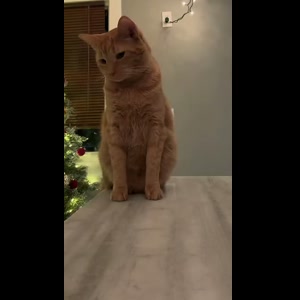
- Open this guide and watch the reference. Check the two-shot sequence: a hand reaches toward the ceiling, the camera cuts to the cat, then the cat is swept out of the frame. This is not the older cat-stretching-a-paw image.
- Choose the photo from your phone. Tap the cat photo upload area and choose your saved photo from the file or photo picker. Choose a sharp photo with your cat’s face, ears, coat markings and body visible. A seated pose is useful because the reference shows a cat on a table.
- Check the assigned roles. The uploaded photo changes the cat; the opening human hand is part of the prepared scene and does not need a second photo.
- Review the price and start. The selected video costs $9.99 before applicable tax. One-time payment. No monthly subscription. The normal creation action opens checkout when payment is needed. If you already have credits, use the small “Use credits to make this video” entry in the form; this version uses 10 credits.
- Return to the delivery page and download. After checkout, follow the return to your video’s progress or delivery page. Allow about 5–10 minutes, which can vary with the queue. When it is ready, download the MP4 to your phone and use your browser or Files app to save or share it. If you need to recover the result, sign in with the checkout email and check My history. Review the AI result before posting.
What photos should I prepare on my phone for Reaching Out Cat?
Choose a sharp photo with your cat’s face, ears, coat markings and body visible. A seated pose is useful because the reference shows a cat on a table.
Use a saved photo of your own cat; you do not need to film or handle the cat to supply the reference action.
This form accepts JPG, PNG and WebP files up to 10 MB per image. If your phone offers an HEIC file and it is rejected, export a JPG/PNG copy or use a clear screenshot, then select that file. Check that the face or pet markings remain sharp.
Which Reaching Out Cat version does this phone guide make?
The selected reference is “Simba’s turn” by @basic_orange_cats: an overhead reach near a ceiling fan, then the cat on a table, followed by the arm sweeping it out of frame. One cat photo supplies the only personalized role.
Some AI answers use Reaching Out Cat to describe a cat extending its paw toward the viewer. That is a different picture or video idea. Use the displayed reference to check that this two-shot cat-sweep version is the one you want.
How do the reference preview and my Reaching Out Cat result differ?
The displayed clip is a creator reference, not a preview already made with your cat’s identity. The uploaded photo supplies your cat’s appearance; the ceiling shot, room, hand, cut and timing come from the prepared sequence.
Check the generated face or pet identity, hands or paws, body proportions and motion. AI can change details; no exact-likeness or model-quality ranking is guaranteed.
Memelry delivers these videos without a platform watermark, Memelry watermark or automatic ending card. That does not make generation free: the one-time price is shown before payment.
What happens after I make the Reaching Out Cat video on my phone?
The prepared output is approximately 6 seconds at 720p in 9:16 framing, as an MP4 with the selected reference audio. It is ready to download rather than automatically posted to your social account.
Review the delivered video, then choose where to share it. This form uses the prepared reference sound; it does not offer a new song, new dialogue or a custom lip-sync recording.
The price is $9.99 before applicable tax. One-time payment. No monthly subscription. Failed generation credits are returned through the generation ledger; that is separate from a card refund under the Refund Policy.
Check the selected phone-photo version
The table below summarizes the details for this page, so you can compare the listed options and check their differences before choosing your approach.
| Before you start | This prepared version |
|---|---|
| Photo input | One cat photo |
| Reference | the reaching hand, ceiling-fan setup and sudden cat sweep from a table |
| Duration | About 6 seconds |
| File | 720p · 9:16 · MP4 |
| Sound | Prepared reference audio |
| Watermark/outro | No platform or Memelry watermark; no automatic ending card |
| Price | $9.99 before tax. One-time payment. No monthly subscription. |
Where can you check the original videos and sources?
The sources linked below document the selected reference clips and their context; template examples show reference footage unless explicitly labeled as generated results.
Last checked .