Make this prepared Mean Girls Jingle Bell Rock video step by step
Use the reference and role screenshots to check the version, then follow these steps in the embedded tool.
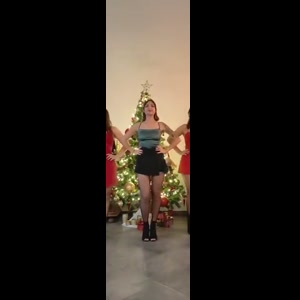
- Watch the selected reference. The selected reference is a 15-second living-room trio beside a Christmas tree. It is not the complete four-person movie-stage scene. Adding a fourth person to a photo does not add a fourth customizable role.
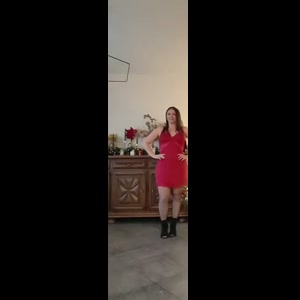
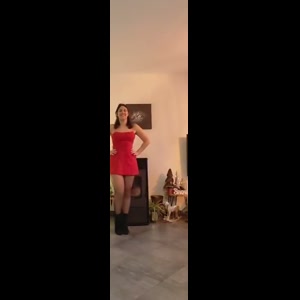
- Prepare and assign the photos. Photo 1: the center dancer in the opening formation; Photo 2: the dancer on the viewer’s left; Photo 3: the dancer on the viewer’s right. One clear adult per photo; face and intended outfit visible, even light and no heavy filter. Photo 1 is required. The other photo slots are optional; a blank slot retains its reference performer. Use a separate image for each role you want changed.
- Check the price and start. This prepared version costs $14.99 before applicable tax. One-time payment. No monthly subscription. Existing purchased credits remain usable through “Use credits to make this video” in the form; this version uses 15 credits. Checkout shows the final tax-inclusive total before payment. The normal creation action opens checkout when payment is needed.
- Download and review. After delivery, download the MP4 from the result page. On a phone, use the browser’s download or share controls to save the file. To recover a delivered result, sign in with the checkout email and open My history. AI can change facial details, hands or paws, clothing and movement. Review the full result before posting; a clear input helps but does not guarantee exact likeness. The displayed source reference is not a measured quality comparison between models.
Match three portraits to the living-room formation
Photo 1 casts the center dancer, photo 2 the opening viewer-left dancer and photo 3 the opening viewer-right dancer. Prepare one clear adult portrait per role, using separate crops if the starting image is a group photo.
The selected reference is a 15-second living-room trio beside a Christmas tree. It is not the complete four-person movie-stage scene. Adding a fourth person to a photo does not add a fourth customizable role.
Can I start with only my own selfie?
Yes. Photo 1 is required; the other two slots are optional. Leaving them empty keeps those reference dancers. Selecting the same portrait in each slot requests the same identity for all three roles, with AI variation still possible.
The model uses the assigned photos for appearance and the reference for movement and camera timing. Keep the photo order consistent and inspect each person during the forward steps and side movements; perfect identity consistency is not guaranteed.
Choose the photos and keep their roles clear
Photo 1: the center dancer in the opening formation; Photo 2: the dancer on the viewer’s left; Photo 3: the dancer on the viewer’s right.
One clear adult per photo; face and intended outfit visible, even light and no heavy filter.
Photo 1 is required. The other photo slots are optional; a blank slot retains its reference performer. Use a separate image for each role you want changed.
Make and save the video in your phone browser
Open this page in your phone browser and use the numbered photo pickers. Choose JPG, PNG or WebP files up to 10 MB each. If an HEIC file is rejected, export a JPG/PNG copy or select a clear screenshot. Check that the face, pet markings or car details remain sharp.
After delivery, download the MP4 from the result page. On a phone, use the browser’s download or share controls to save the file. To recover a delivered result, sign in with the checkout email and open My history.
Review the selected purchase and download
This prepared version costs $14.99 before applicable tax. One-time payment. No monthly subscription. Existing purchased credits remain usable through “Use credits to make this video” in the form; this version uses 15 credits. Checkout shows the final tax-inclusive total before payment.
Approximately 15 seconds, 720p, 9:16 MP4, with the prepared reference audio.
The delivered MP4 has no platform watermark, no Memelry watermark and no automatic ending card. The displayed video is the prepared source reference, not a personalized preview already generated from your photos.
Generation failures return the used generation credits. A credit return is separate from a refund to your payment method; payment refunds follow the Refund Policy.
Check the selected Mean Girls Jingle Bell Rock version
The table below summarizes the details for this page, so you can compare the listed options and check their differences before choosing your approach.
| Before you start | This prepared version |
|---|---|
| Reference scene | the three-person Jingle Bell Rock dance beside a Christmas tree in a living room |
| Upload roles | Photo 1: the center dancer in the opening formation; Photo 2: the dancer on the viewer’s left; Photo 3: the dancer on the viewer’s right. |
| Output | Approximately 15 seconds, 720p, 9:16 MP4, with the prepared reference audio. |
| Payment | $14.99 before applicable tax. One-time payment. No monthly subscription. |
| Existing credits | 15 |
| Watermark / outro | No platform or Memelry watermark; no automatic ending card |
Where can you check the original videos and sources?
The sources linked below document the selected reference clips and their context; template examples show reference footage unless explicitly labeled as generated results.
Last checked .