Skip to content

Which tool should you use for a Never Let Her Pay AI video?

Choose the prepared Never Let Her Pay tool when you want the exact scene shown in the preview with the numbered photo roles. Approximately 11 seconds, 720p, 9:16 MP4, with the prepared reference audio. $10.99 before applicable tax. One-time payment. No monthly subscription. Editing existing footage and building a new scene require different workflows.

Choose photos and make this video

$10.99 before applicable tax. One-time payment. No monthly subscription.

Make Never Let Her Pay on Your Phone

Match the reference roles to your photos

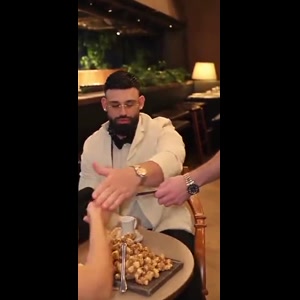
These are screenshots from the selected preview, not customer photos. The numbers match the upload slots below; use your own photos for the final appearance.

Photo 1: Lead role
Photo 1: Lead role

Make the selected Never Let Her Pay reference with your photos

Choose the photos for your selected template, complete checkout, then download the finished MP4 after generation; the steps below explain what to prepare.

  1. Preview the selected scene. Only the wallet-holding diner is personalized. The waiter and dining companion remain part of the prepared scene.
  2. Assign your photos. One clear adult per photo; face and intended outfit visible, even light and no heavy filter. Follow the numbered reference roles.
  3. Review the price and generate. $10.99 for this selected version before applicable tax. One-time payment. No monthly subscription.
  4. Review and download. Inspect the generated identity, motion and sound before sharing the MP4.

When does this prepared template fit?

Photo 1 replaces the wallet-holding diner through the restaurant payment moment and kitchen-sink ending. The companion remains a reference character; the form has no second diner-photo slot.

The joke is the sponge revealed in the wallet and the dishwashing payoff. This prepared video is not a generic romantic montage or a text-only story about paying for dinner.

Photo 1: the seated foreground diner with the wallet. This prepared form has one personalized role. It does not turn a group photo into extra independently controlled subjects.

When would I edit existing footage instead?

If you already have footage of the performance and want to trim it, arrange shots or add captions, use a video editor for that footage. This photo-based generator creates a new AI recreation of its prepared reference; it is not a timeline editor.

If you want a new setting, new plot, different choreography or a different cast size, check that a separate prepared version exists. The upload slots on this page do not select those changes.

How should I judge identity and movement?

One clear adult per photo; face and intended outfit visible, even light and no heavy filter.

AI can change facial details, hands or paws, clothing and movement. Review the full result before posting; a clear input helps but does not guarantee exact likeness. The displayed source reference is not a measured quality comparison between models.

A claim that a model is the most realistic is different from a matched comparison using the same inputs. This page provides the selected reference and configuration, without claiming a tested quality winner.

What does this one-video route cost and include?

This prepared version costs $10.99 before applicable tax. One-time payment. No monthly subscription. Existing purchased credits remain usable through “Use credits to make this video” in the form; this version uses 11 credits. Checkout shows the final tax-inclusive total before payment.

Approximately 11 seconds, 720p, 9:16 MP4, with the prepared reference audio.

The delivered MP4 has no platform watermark, no Memelry watermark and no automatic ending card. The displayed video is the prepared source reference, not a personalized preview already generated from your photos.

Generation failures return the used generation credits. A credit return is separate from a refund to your payment method; payment refunds follow the Refund Policy.

Choose a workflow for the scene you want

The table below summarizes the details for this page, so you can compare the listed options and check their differences before choosing your approach.

Your goalPrepared tool on this pageOther workflow to consider
Put your photos in this exact referencePhoto 1: the seated foreground diner with the wallet.A prepared template for a different scene if this preview does not match
Edit footage you already recordedCreates a new AI recreation from photosA timeline editor for cuts, captions and sound
Invent a new story or sceneUses the displayed prepared sceneA separate scene-generation and editing workflow
Choose a new voice or soundtrackIncludes the prepared reference recording; no custom speech or song controlA separate audio and editing workflow
Download this prepared versionApproximately 11 seconds, 720p, 9:16 MP4, with the prepared reference audio. $10.99 before applicable tax. One-time payment. No monthly subscription.Check the selected tool’s own export, price and permissions
Watermark / outroNo platform or Memelry watermark; no automatic ending cardDepends on the selected tool; not verified by this comparison

Where can you check the original videos and sources?

The linked Memelry template shows its selected reference, photo roles and specifications. This comparison describes editing workflows without claiming a matched quality test.

    Last checked .

    How do you start making your Never Let Her Pay AI video?

    You can start this AI video by uploading clear, separate photos into the generator below, choosing the intended person for each available photo slot.

    See the Never Let Her Pay AI generator and example

    Already have credits?

    This video uses 11 credits. Sign in with your checkout email to use your balance.

    No account needed: pay $10.99 once and your video starts. Signed in with credits? It uses 11 credits instead.

    Already paid? Use your checkout email to recover your credits. Sign in to use your credits.

    Generation failures and moderation refusals return the used generation credits automatically. A credit return is separate from a refund to your payment card. Refund policy

    Photo requirements

    • Use: One person or one pet, alone in the photo
    • Use: Face clear and facing the camera
    • Use: Even light, sharp, no heavy filters
    • Avoid: Group photos, tiny or cut-off faces
    • Avoid: Sunglasses, masks or hands over the face
    • Avoid: Anyone under 18

    JPG, PNG or WebP, up to 10 MB. Uploaded photos are stored to provide the service. Delete your account or contact support to request deletion.

    Output
    Length
    about 11 seconds
    Quality
    720p (720×1280)
    Model
    Seedance 2.5
    Format
    9:16 vertical MP4
    Sound
    The original clip's sound
    Ready in
    5–10 minutes
    Cost
    $10.99 per video, or 11 credits if you have a pack

    Effect reference (not a Memelry-generated result)

    11s · 720p · 9:16 vertical · MP4 with the original sound

    Who would you put in this video?

    Send this template to a friend and choose your roles. The link shares this public page.

    What else do people ask about Never Let Her Pay?

    These answers distinguish the prepared scene from source-video editing, explaining photo roles, outfit expectations and why the comparison does not establish an accuracy winner.

    +Which workflow should I choose for this scene?

    Choose the prepared Never Let Her Pay tool when you want the exact scene shown in the preview with the numbered photo roles. Approximately 11 seconds, 720p, 9:16 MP4, with the prepared reference audio. $10.99 before applicable tax. One-time payment. No monthly subscription. Editing existing footage and building a new scene require different workflows.

    +Put your photo in the sponge-wallet restaurant gag

    Photo 1 replaces the wallet-holding diner through the restaurant payment moment and kitchen-sink ending. The companion remains a reference character; the form has no second diner-photo slot. The joke is the sponge revealed in the wallet and the dishwashing payoff. This prepared video is not a generic romantic montage or a text-only story about paying for dinner.

    +Which photos do I need for Never Let Her Pay?

    Photo 1: the seated foreground diner with the wallet. One clear adult per photo; face and intended outfit visible, even light and no heavy filter. This prepared form has one personalized role. It does not turn a group photo into extra independently controlled subjects.

    +How much does one Never Let Her Pay video cost?

    This prepared version costs $10.99 before applicable tax. One-time payment. No monthly subscription. Existing purchased credits remain usable through “Use credits to make this video” in the form; this version uses 11 credits. Checkout shows the final tax-inclusive total before payment. Approximately 11 seconds, 720p, 9:16 MP4, with the prepared reference audio.

    +Does the Never Let Her Pay download have a watermark or an outro?

    The delivered MP4 has no platform watermark, no Memelry watermark and no automatic ending card. The displayed video is the prepared source reference, not a personalized preview already generated from your photos.

    +Can I make and download Never Let Her Pay on my phone?

    Open this page in your phone browser and use the numbered photo pickers. Choose JPG, PNG or WebP files up to 10 MB each. If an HEIC file is rejected, export a JPG/PNG copy or select a clear screenshot. Check that the face, pet markings or car details remain sharp. After delivery, download the MP4 from the result page. On a phone, use the browser’s download or share controls to save the file. To recover a delivered result, sign in with the checkout email and open My history.

    +Can I change the ending or preview myself for free?

    The visible clip is the source reference. It lets you check the sponge reveal and ending, but is not a free result made with your own face. The photo controls personalize the assigned diner in the prepared 11-second sequence. They do not select a new restaurant, a different ending or a replacement soundtrack.

    +Is the preview a free Never Let Her Pay result made with my photo?

    You can watch the source reference before paying. Generating a personalized version is a paid step at the displayed price, or uses existing purchased credits. This page does not advertise a free personalized trial or free watermark-free generation.

    +Does Never Let Her Pay include its sound?

    The prepared recording comes with this version. The form does not offer a replacement song, custom dialogue or a new lip-sync recording. Including the reference sound does not guarantee perfectly synchronized generated mouths.

    +What happens to my uploaded photos if I delete my account?

    Upload only photos you have permission to use. Memelry sends the images to AI providers to generate the requested result. Deleting your account removes your linked uploaded photos and generated media from Memelry storage; retained payment and conversion records do not include the media. Provider copies follow their own retention policies, and deletion cannot remove files already downloaded by you or others.

    Can't find your meme? Paste the TikTok link →Send any meme video and your photos; we put your faces and clothes into it.