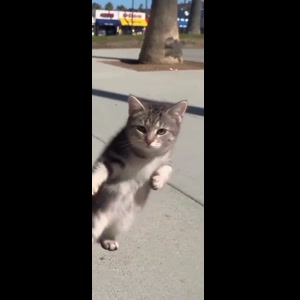
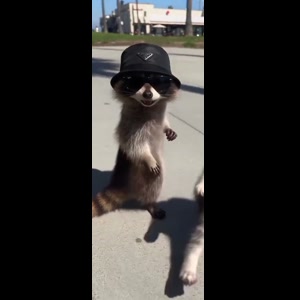
Make the selected Raccoon and Cat Paparazzi reference with your photos
Choose the photos for your selected template, complete checkout, then download the finished MP4 after generation; the steps below explain what to prepare.
- Preview the selected scene. The first photo casts the cat’s role; the optional second photo casts the raccoon’s role. Leave slot 2 blank to retain the bucket-hat raccoon from the reference.
- Assign your photos. One clear animal photo per selected role; show the face, ears, coat markings and body. Follow the numbered reference roles.
- Review the price and generate. $10.99 for this selected version before applicable tax. One-time payment. No monthly subscription.
- Review and download. Inspect the generated identity, motion and sound before sharing the MP4.
When does this prepared template fit?
Photo 1 fills the cat role starting on the viewer’s right. Photo 2 fills the bucket-hat raccoon role starting on the viewer’s left. Use a separate clear pet photo for each role you want changed.
Only photo 1 is required. Leave photo 2 blank to retain the reference raccoon; uploading only the cat does not remove its walking partner. A group pet photo is not automatically split between the two roles.
Photo 1: the cat starting on the viewer’s right; Photo 2: the bucket-hat raccoon starting on the viewer’s left. Photo 1 is required. The other photo slots are optional; a blank slot retains its reference performer. Use a separate image for each role you want changed.
When would I edit existing footage instead?
If you already have footage of the performance and want to trim it, arrange shots or add captions, use a video editor for that footage. This photo-based generator creates a new AI recreation of its prepared reference; it is not a timeline editor.
If you want a new setting, new plot, different choreography or a different cast size, check that a separate prepared version exists. The upload slots on this page do not select those changes.
How should I judge identity and movement?
One clear animal photo per selected role; show the face, ears, coat markings and body.
AI can change facial details, hands or paws, clothing and movement. Review the full result before posting; a clear input helps but does not guarantee exact likeness. The displayed source reference is not a measured quality comparison between models.
A claim that a model is the most realistic is different from a matched comparison using the same inputs. This page provides the selected reference and configuration, without claiming a tested quality winner.
What does this one-video route cost and include?
This prepared version costs $10.99 before applicable tax. One-time payment. No monthly subscription. Existing purchased credits remain usable through “Use credits to make this video” in the form; this version uses 11 credits. Checkout shows the final tax-inclusive total before payment.
Approximately 11 seconds, 720p, 9:16 MP4, with the prepared reference audio.
The delivered MP4 has no platform watermark, no Memelry watermark and no automatic ending card. The displayed video is the prepared source reference, not a personalized preview already generated from your photos.
Generation failures return the used generation credits. A credit return is separate from a refund to your payment method; payment refunds follow the Refund Policy.
Choose a workflow for the scene you want
The table below summarizes the details for this page, so you can compare the listed options and check their differences before choosing your approach.
| Your goal | Prepared tool on this page | Other workflow to consider |
|---|---|---|
| Put your photos in this exact reference | Photo 1: the cat starting on the viewer’s right; Photo 2: the bucket-hat raccoon starting on the viewer’s left. | A prepared template for a different scene if this preview does not match |
| Edit footage you already recorded | Creates a new AI recreation from photos | A timeline editor for cuts, captions and sound |
| Invent a new story or scene | Uses the displayed prepared scene | A separate scene-generation and editing workflow |
| Choose a new voice or soundtrack | Includes the prepared reference recording; no custom speech or song control | A separate audio and editing workflow |
| Download this prepared version | Approximately 11 seconds, 720p, 9:16 MP4, with the prepared reference audio. $10.99 before applicable tax. One-time payment. No monthly subscription. | Check the selected tool’s own export, price and permissions |
| Watermark / outro | No platform or Memelry watermark; no automatic ending card | Depends on the selected tool; not verified by this comparison |
Where can you check the original videos and sources?
The linked Memelry template shows its selected reference, photo roles and specifications. This comparison describes editing workflows without claiming a matched quality test.
Last checked .