Skip to content

Which photo should I use for What If You Fly?

Choose one sharp, front-facing portrait with the face, hair and intended outfit visible. A clear upper-body photo helps the bedroom close-up; a fuller view gives more information for the flight. Keep other people out of the photo. This prepared version uses one photo for the featured lead through the full sequence. $16.99 before applicable tax. One-time payment. No monthly subscription.

Choose photos and make this video

$16.99 before applicable tax. One-time payment. No monthly subscription.

What If You Fly meaning

Match the reference roles to your photos

These are screenshots from the selected preview, not customer photos. The numbers match the upload slots below; use your own photos for the final appearance.

Photo 1: the featured lead across all shots

Already have credits?

This video uses 17 credits. Sign in with your checkout email to use your balance.

No account needed: pay $16.99 once and your video starts. Signed in with credits? It uses 17 credits instead.

Already paid? Use your checkout email to recover your credits. Sign in to use your credits.

Generation failures and moderation refusals return the used generation credits automatically. A credit return is separate from a refund to your payment card. Refund policy

Photo requirements

  • Use: One person or one pet, alone in the photo
  • Use: Face clear and facing the camera
  • Use: Even light, sharp, no heavy filters
  • Avoid: Group photos, tiny or cut-off faces
  • Avoid: Sunglasses, masks or hands over the face
  • Avoid: Anyone under 18

JPG, PNG or WebP, up to 10 MB. Uploaded photos are stored to provide the service. Delete your account or contact support to request deletion.

Output
Length
about 17 seconds
Quality
720p (960×720)
Model
Seedance 2.5
Format
4:3 horizontal MP4
Sound
The original clip's sound
Ready in
5–10 minutes
Cost
$16.99 per video, or 17 credits if you have a pack

Effect reference (not a Memelry-generated result)

17s · 720p · 4:3 horizontal · MP4 with the original sound

Who would you put in this video?

Send this template to a friend and choose your roles. The link shares this public page.

Make your What If You Fly video

Choose the photos for your selected template, complete checkout, then download the finished MP4 after generation; the steps below explain what to prepare.

  1. Watch this exact reference. Confirm the scene, role, audio and framing in the embedded player. The preview is not a personalized result.
  2. Upload the one role photo. Choose one sharp, front-facing portrait with the face, hair and intended outfit visible. A clear upper-body photo helps the bedroom close-up; a fuller view gives more information for the flight. Keep other people out of the photo. JPG, PNG or WebP up to 10 MB.
  3. Review the one-time purchase. $16.99 before applicable tax. One-time payment. No monthly subscription. Or use 17 existing credits through the small credit entry.
  4. Download and inspect. About 17 seconds, 720p, 4:3 MP4 with the prepared reference recording. Review the full result; recover a delivered video in My history using your checkout email.

Which photo should I upload?

Choose one sharp, front-facing portrait with the face, hair and intended outfit visible. A clear upper-body photo helps the bedroom close-up; a fuller view gives more information for the flight. Keep other people out of the photo.

Use one JPG, PNG or WebP up to 10 MB. If an HEIC photo is rejected, export a JPG or PNG copy first. The tool has one upload slot for this version. A group photo does not add separate roles.

How should I prepare the photo?

Use natural facial detail and clear hair edges. Avoid covered eyes, strong beauty filters, a tiny distant face or several people in the same crop. Choose the outfit you want to carry through the reference.

Check the face in both close-ups and wide shots. A tight selfie contains less clothing and body information than an upper-body or full-length photo. The model may infer details that the photo does not show.

How does the photo stay recognizable?

The photographed person supplies the intended face, hair, body proportions and clothes across the cuts. The reference supplies the motion, expression timing and camera. An empty background role remains the reference performer.

AI may alter facial details, hands, clothes and body position during fast movements or cuts. These are generation instructions, not a guarantee of exact likeness or a tested quality ranking. Review the whole MP4 before sharing.

Which exact version will I get?

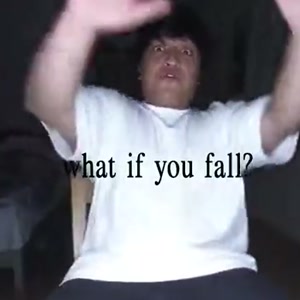
The solo bedroom-chair performance, collapsing floor, fall into the sky, fiery flight over the ocean and rise above clouds.

Watch all of the reference with sound before buying. About 17 seconds, 720p, 4:3 MP4 with the prepared reference recording. The original sequence and framing determine this prepared version; your photo changes the assigned subject. The tool does not offer a new background, custom dialogue, replacement music or a different ending.

Can I make this in my phone browser?

Open the embedded tool in Safari or Chrome and choose the photo through the file picker. No separate recording of the action is required. Check the selected reference and price, then use checkout for this video or the existing-credit entry.

Download the MP4 from the result or delivery page using the browser’s save/share controls. Sign in with your checkout email and open My history if you need to recover a delivered result.

What does this individual video cost?

$16.99 before applicable tax. One-time payment. No monthly subscription. Existing customers can use 17 credits through “Use credits to make this video” in the form.

The playable preview is the prepared reference, not a free personalized generation. About 17 seconds, 720p, 4:3 MP4 with the prepared reference recording. Generation usually takes 5–10 minutes and can vary with the queue.

Delivered MP4s have no platform or Memelry watermark and no automatic ending card. Technical generation failures return generation credits; cash refunds follow the Refund Policy. Credit returns and card refunds are different.

Check this prepared version

The table below summarizes the details for this page, so you can compare the listed options and check their differences before choosing your approach.

DetailSelected version
Scenethe solo bedroom-chair performance, collapsing floor, fall into the sky, fiery flight over the ocean and rise above clouds
InputOne person photo
TargetAbout 17 seconds, 720p, 4:3 MP4 with the prepared reference recording.
Photo rolesOne required role; background subjects unchanged
One-time price$16.99 before applicable tax. One-time payment. No monthly subscription.
Existing credits17
DeliveryMP4; no added watermark or automatic ending card

Where can you check the original videos and sources?

The sources linked below document the selected reference clips and their context; template examples show reference footage unless explicitly labeled as generated results.

Last checked .

What else do people ask about What If You Fly?

People ask about photos, performer choices, payment, music and downloads; the answers below explain the available options and requirements for the page you are viewing.

+How do I make the What If You Fly video from one photo?

Make the What If You Fly / What If You Fall Twin AI meme from one photo. Start in a bedroom, drop through the collapsing floor, then fly on fire above the sea and clouds. Upload the one role photo in the embedded tool, review the preview and start the selected video. About 17 seconds, 720p, 4:3 MP4 with the prepared reference recording. $16.99 before applicable tax. One-time payment. No monthly subscription.

+Is the What If You Fly AI template free?

You can view the prepared reference without buying. A personalized generation costs $16.99 before applicable tax or 17 existing credits. One-time payment. No monthly subscription. A free editing template or signup offer elsewhere does not establish a free render of this exact scene.

+Which photo works best for What If You Fly?

Choose one sharp, front-facing portrait with the face, hair and intended outfit visible. A clear upper-body photo helps the bedroom close-up; a fuller view gives more information for the flight. Keep other people out of the photo.

+Can I make What If You Fly without downloading an app?

Yes. Use the embedded tool in your phone browser, upload the role photo and review the one-time price. Download the finished MP4 using your browser’s save/share controls.

+What length and format is this What If You Fly version?

About 17 seconds, 720p, 4:3 MP4 with the prepared reference recording. This is the prepared version on this page; another tool’s shorter edit or different aspect ratio is a separate version.

+Can I change the scene, sound or ending?

This tool follows its prepared reference and recording. It has no control for a new background, chosen music, custom dialogue, aspect-ratio conversion or a different ending.

+Does the download have a watermark or automatic outro?

No platform or Memelry watermark and no automatic ending card are added to the delivered video. The reference preview is separate from the personalized result.

+Is this a subscription?

$16.99 before applicable tax. One-time payment. No monthly subscription. Existing credits remain usable; this video uses 17 credits.

+Why can the result change details from my photo?

The photographed person supplies the intended face, hair, body proportions and clothes across the cuts. The reference supplies the motion, expression timing and camera. An empty background role remains the reference performer. AI may alter facial details, hands, clothes and body position during fast movements or cuts. These are generation instructions, not a guarantee of exact likeness or a tested quality ranking. Review the whole MP4 before sharing.

+Can I make What If You Fly with just one selfie?

Yes. This prepared version takes one person photo. A sharp upper-body image with visible hair and clothing gives more information than a tightly cropped face. The same identity is assigned to the bedroom, fall, ocean flight and cloud ending.

+Is this the angel-wings slideshow version?

No. The embedded reference is the bedroom floor-collapse, fire-powered flight and ocean/cloud sequence. Generic dreamy photo transitions, angel wings and motivational slideshows are different versions.

+Do I need to write a What If You Fly prompt?

No prompt entry is required. The prepared instruction assigns your photo to the lead across the timed bedroom, fall and flying shots. You supply the appearance; the reference supplies the sequence.

Can't find your meme? Paste the TikTok link →Send any meme video and your photos; we put your faces and clothes into it.