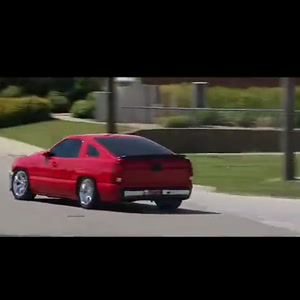
Make the selected Need for Speed Car Edit reference with your photos
Choose the photos for your selected template, complete checkout, then download the finished MP4 after generation; the steps below explain what to prepare.
- Preview the selected scene. Upload a car photo, not a driver portrait. This page replaces the featured vehicle while following the selected reference driving sequence.
- Assign your photos. One clear photo of the whole car, with bodywork and wheels visible. Follow the numbered reference roles.
- Review the price and generate. $14.99 for this selected version before applicable tax. One-time payment. No monthly subscription.
- Review and download. Inspect the generated identity, motion and sound before sharing the MP4.
When does this prepared template fit?
Upload one clear car photo with the paint, body shape, wheels and important modifications visible. A well-lit three-quarter view can show the front or rear together with the side; avoid an image where another vehicle hides your car.
The selected reference supplies the street-driving montage, camera changes and sound. This form has one car-photo input, rather than a set of separate driver and vehicle-detail slots.
Photo 1: the red sports car that appears throughout the driving sequence. This prepared form has one personalized role. It does not turn a group photo into extra independently controlled subjects.
When would I edit existing footage instead?
If you already have footage of the performance and want to trim it, arrange shots or add captions, use a video editor for that footage. This photo-based generator creates a new AI recreation of its prepared reference; it is not a timeline editor.
If you want a new setting, new plot, different choreography or a different cast size, check that a separate prepared version exists. The upload slots on this page do not select those changes.
How should I judge identity and movement?
One clear photo of the whole car, with bodywork and wheels visible.
AI can change facial details, hands or paws, clothing and movement. Review the full result before posting; a clear input helps but does not guarantee exact likeness. The displayed source reference is not a measured quality comparison between models.
A claim that a model is the most realistic is different from a matched comparison using the same inputs. This page provides the selected reference and configuration, without claiming a tested quality winner.
What does this one-video route cost and include?
This prepared version costs $14.99 before applicable tax. One-time payment. No monthly subscription. Existing purchased credits remain usable through “Use credits to make this video” in the form; this version uses 15 credits. Checkout shows the final tax-inclusive total before payment.
Approximately 15 seconds, 720p, 16:9 MP4, with the prepared reference audio.
The delivered MP4 has no platform watermark, no Memelry watermark and no automatic ending card. The displayed video is the prepared source reference, not a personalized preview already generated from your photos.
Generation failures return the used generation credits. A credit return is separate from a refund to your payment method; payment refunds follow the Refund Policy.
Choose a workflow for the scene you want
The table below summarizes the details for this page, so you can compare the listed options and check their differences before choosing your approach.
| Your goal | Prepared tool on this page | Other workflow to consider |
|---|---|---|
| Put your photos in this exact reference | Photo 1: the red sports car that appears throughout the driving sequence. | A prepared template for a different scene if this preview does not match |
| Edit footage you already recorded | Creates a new AI recreation from photos | A timeline editor for cuts, captions and sound |
| Invent a new story or scene | Uses the displayed prepared scene | A separate scene-generation and editing workflow |
| Choose a new voice or soundtrack | Includes the prepared reference recording; no custom speech or song control | A separate audio and editing workflow |
| Download this prepared version | Approximately 15 seconds, 720p, 16:9 MP4, with the prepared reference audio. $14.99 before applicable tax. One-time payment. No monthly subscription. | Check the selected tool’s own export, price and permissions |
| Watermark / outro | No platform or Memelry watermark; no automatic ending card | Depends on the selected tool; not verified by this comparison |
Where can you check the original videos and sources?
The linked Memelry template shows its selected reference, photo roles and specifications. This comparison describes editing workflows without claiming a matched quality test.
Last checked .