Skip to content

Need for Speed AI From a Photo of Your Own Car

Upload one clear car photo with the paint, body shape, wheels and important modifications visible. A well-lit three-quarter view can show the front or rear together with the side; avoid an image where another vehicle hides your car. Use the tool on this page for the approximately 15-second 720p MP4 with reference audio. $14.99 before applicable tax. One-time payment. No monthly subscription.

Choose photos and make this video

$14.99 before applicable tax. One-time payment. No monthly subscription.

View the main Need for Speed Car Edit template

Match the reference roles to your photos

These are screenshots from the selected preview, not customer photos. The numbers match the upload slots below; use your own photos for the final appearance.

Photo 1: Your car
Photo 1: Your car

Make this prepared Need for Speed Car Edit video step by step

Use the reference and role screenshots to check the version, then follow these steps in the embedded tool.

  1. Watch the selected reference. The selected reference supplies the street-driving montage, camera changes and sound. This form has one car-photo input, rather than a set of separate driver and vehicle-detail slots.
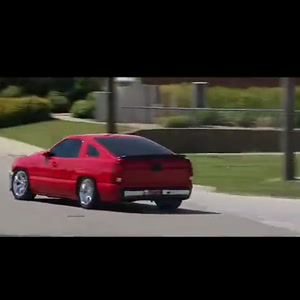
  2. Prepare and assign the photos. Photo 1: the red sports car that appears throughout the driving sequence. One clear photo of the whole car, with bodywork and wheels visible. This prepared form has one personalized role. It does not turn a group photo into extra independently controlled subjects.
  3. Check the price and start. This prepared version costs $14.99 before applicable tax. One-time payment. No monthly subscription. Existing purchased credits remain usable through “Use credits to make this video” in the form; this version uses 15 credits. Checkout shows the final tax-inclusive total before payment. The normal creation action opens checkout when payment is needed.
  4. Download and review. After delivery, download the MP4 from the result page. On a phone, use the browser’s download or share controls to save the file. To recover a delivered result, sign in with the checkout email and open My history. AI can change facial details, hands or paws, clothing and movement. Review the full result before posting; a clear input helps but does not guarantee exact likeness. The displayed source reference is not a measured quality comparison between models.

Use the upload for your car, not a driver portrait

Upload one clear car photo with the paint, body shape, wheels and important modifications visible. A well-lit three-quarter view can show the front or rear together with the side; avoid an image where another vehicle hides your car.

The selected reference supplies the street-driving montage, camera changes and sound. This form has one car-photo input, rather than a set of separate driver and vehicle-detail slots.

Will the model keep every modification exactly?

The car photo supplies the intended vehicle appearance. AI can alter badges, wheels, bodywork, paint reflections and small modifications between exterior and interior shots; inspect the complete result.

The prepared clip is a 15-second, 16:9 landscape montage. It is not a vehicle-accurate simulation or a guarantee that every angle will reproduce unseen details.

Is the displayed video a personalized draft of my car?

No. It is the prepared source reference. You can watch it before paying to understand the scene, but it has not been generated with your uploaded car.

This form does not offer a free personalized draft or a low-resolution approval stage before the paid generation. Review the selected settings and price before starting.

Choose the photos and keep their roles clear

Photo 1: the red sports car that appears throughout the driving sequence.

One clear photo of the whole car, with bodywork and wheels visible.

This prepared form has one personalized role. It does not turn a group photo into extra independently controlled subjects.

Make and save the video in your phone browser

Open this page in your phone browser and use the numbered photo pickers. Choose JPG, PNG or WebP files up to 10 MB each. If an HEIC file is rejected, export a JPG/PNG copy or select a clear screenshot. Check that the face, pet markings or car details remain sharp.

After delivery, download the MP4 from the result page. On a phone, use the browser’s download or share controls to save the file. To recover a delivered result, sign in with the checkout email and open My history.

Review the selected purchase and download

This prepared version costs $14.99 before applicable tax. One-time payment. No monthly subscription. Existing purchased credits remain usable through “Use credits to make this video” in the form; this version uses 15 credits. Checkout shows the final tax-inclusive total before payment.

Approximately 15 seconds, 720p, 16:9 MP4, with the prepared reference audio.

The delivered MP4 has no platform watermark, no Memelry watermark and no automatic ending card. The displayed video is the prepared source reference, not a personalized preview already generated from your photos.

Generation failures return the used generation credits. A credit return is separate from a refund to your payment method; payment refunds follow the Refund Policy.

Check the selected Need for Speed Car Edit version

The table below summarizes the details for this page, so you can compare the listed options and check their differences before choosing your approach.

Before you startThis prepared version
Reference scenethe red sports-car street-driving montage with interior and exterior camera changes
Upload rolesPhoto 1: the red sports car that appears throughout the driving sequence.
OutputApproximately 15 seconds, 720p, 16:9 MP4, with the prepared reference audio.
Payment$14.99 before applicable tax. One-time payment. No monthly subscription.
Existing credits15
Watermark / outroNo platform or Memelry watermark; no automatic ending card

Where can you check the original videos and sources?

The sources linked below document the selected reference clips and their context; template examples show reference footage unless explicitly labeled as generated results.

    Last checked .

    How do you start making your Need for Speed Car Edit AI video?

    You can start this AI video by uploading clear, separate photos into the generator below, choosing the intended person for each available photo slot.

    See the Need for Speed Car Edit AI generator and example

    Already have credits?

    This video uses 15 credits. Sign in with your checkout email to use your balance.

    No account needed: pay $14.99 once and your video starts. Signed in with credits? It uses 15 credits instead.

    Already paid? Use your checkout email to recover your credits. Sign in to use your credits.

    Generation failures and moderation refusals return the used generation credits automatically. A credit return is separate from a refund to your payment card. Refund policy

    Photo requirements

    • Use: One vehicle, fully visible
    • Use: Clear front three-quarter view showing body and wheels
    • Use: Even light, sharp, no heavy filters
    • Avoid: Several cars or a cropped vehicle
    • Avoid: Covered bodywork or heavy reflections
    • Avoid: Tiny, blurry or heavily filtered photos

    JPG, PNG or WebP, up to 10 MB. Uploaded photos are stored to provide the service. Delete your account or contact support to request deletion.

    Output
    Length
    about 15 seconds
    Quality
    720p (1280×720)
    Model
    Seedance 2.5
    Format
    16:9 horizontal MP4
    Sound
    The original clip's sound
    Ready in
    5–10 minutes
    Cost
    $14.99 per video, or 15 credits if you have a pack

    Effect reference (not a Memelry-generated result)

    15s · 720p · 16:9 horizontal · MP4 with the original sound

    Who would you put in this video?

    Send this template to a friend and choose your roles. The link shares this public page.

    What else do people ask about Need for Speed Car Edit?

    People ask about photos, performer choices, payment, music and downloads; the answers below explain the available options and requirements for the page you are viewing.

    +Use the upload for your car, not a driver portrait

    Upload one clear car photo with the paint, body shape, wheels and important modifications visible. A well-lit three-quarter view can show the front or rear together with the side; avoid an image where another vehicle hides your car. The selected reference supplies the street-driving montage, camera changes and sound. This form has one car-photo input, rather than a set of separate driver and vehicle-detail slots.

    +Which photos do I need for Need for Speed Car Edit?

    Photo 1: the red sports car that appears throughout the driving sequence. One clear photo of the whole car, with bodywork and wheels visible. This prepared form has one personalized role. It does not turn a group photo into extra independently controlled subjects.

    +How much does one Need for Speed Car Edit video cost?

    This prepared version costs $14.99 before applicable tax. One-time payment. No monthly subscription. Existing purchased credits remain usable through “Use credits to make this video” in the form; this version uses 15 credits. Checkout shows the final tax-inclusive total before payment. Approximately 15 seconds, 720p, 16:9 MP4, with the prepared reference audio.

    +Does the Need for Speed Car Edit download have a watermark or an outro?

    The delivered MP4 has no platform watermark, no Memelry watermark and no automatic ending card. The displayed video is the prepared source reference, not a personalized preview already generated from your photos.

    +Can I make and download Need for Speed Car Edit on my phone?

    Open this page in your phone browser and use the numbered photo pickers. Choose JPG, PNG or WebP files up to 10 MB each. If an HEIC file is rejected, export a JPG/PNG copy or select a clear screenshot. Check that the face, pet markings or car details remain sharp. After delivery, download the MP4 from the result page. On a phone, use the browser’s download or share controls to save the file. To recover a delivered result, sign in with the checkout email and open My history.

    +Will the model keep every modification exactly?

    The car photo supplies the intended vehicle appearance. AI can alter badges, wheels, bodywork, paint reflections and small modifications between exterior and interior shots; inspect the complete result. The prepared clip is a 15-second, 16:9 landscape montage. It is not a vehicle-accurate simulation or a guarantee that every angle will reproduce unseen details.

    +Is the displayed video a personalized draft of my car?

    No. It is the prepared source reference. You can watch it before paying to understand the scene, but it has not been generated with your uploaded car. This form does not offer a free personalized draft or a low-resolution approval stage before the paid generation. Review the selected settings and price before starting.

    +Is the preview a free Need for Speed Car Edit result made with my photo?

    You can watch the source reference before paying. Generating a personalized version is a paid step at the displayed price, or uses existing purchased credits. This page does not advertise a free personalized trial or free watermark-free generation.

    +Does Need for Speed Car Edit include its sound?

    The prepared recording comes with this version. The form does not offer a replacement song, custom dialogue or a new lip-sync recording. Including the reference sound does not guarantee perfectly synchronized generated mouths.

    Can't find your meme? Paste the TikTok link →Send any meme video and your photos; we put your faces and clothes into it.