

Make the Wassup Dance from your photos
Choose the photos for your selected template, complete checkout, then download the finished MP4 after generation; the steps below explain what to prepare.
- Recognize the scene. Watch the hillside trio preview and compare the role screenshots with the version you want.
- Choose the people. Upload the opening front-right lead in photo1, the center close-up in photo2 and the left-background performer in photo3.
- Review and generate. Check the $13.99 one-time video price and selected photos. No monthly subscription. Use existing credits if you have a balance.
- Check the result. Inspect faces, hairstyles, clothing and hands throughout the clip before downloading and sharing.
Which dance does “Wassup Dance” mean here?
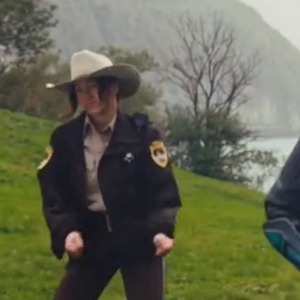
Look for three performers on a green hillside above a lake, not simply any clip using a similar phrase. The shared hands-to-head gesture, the center close-up and the later wide group shots identify this particular format. It is also discussed as Wassup in a Minute, Wassup Wait a Minute and Swiss Side Quest.
The source post linked below is a human Swiss Side Quest performance. Memelry’s current preview is a separate AI-character hillside interpretation, prepared as a 14-second landscape edit. The role screenshots on this page come from that exact preview, not from a different creator’s version.
What are the recognizable Wassup Dance moves?
Start with the small groove and hand gestures in the group formation. The performers bring their hands around the sides of their heads and tilt with the rhythm. The center performer then gets the close-up, with gestures toward the camera, before the scene returns to wider group movement.
If you film it yourself, you supply the performance and editing. If you use the generator here, you supply still photos and the prepared reference provides the intended movement, camera sequence and sound. You do not need to learn or record the steps first.
Match the reference person to the right photo slot
The pictures above identify the three original reference roles. Photo 1 is the opening lead on the viewer’s right. Photo 2 is the central performer who later gets the close-up. Photo 3 is behind on the viewer’s left. Positions can change without changing the assigned identity.
The reference hair, armor, hat and clothing identify the source performers; they are not the requested final appearance. Your uploads guide your own face, hairstyle, body proportions and outfit. Generated details can still vary, including source hair or clothing carrying through.
One photo, two friends or the whole trio?
Only photo 1 is required. With one photo, you replace the opening front-right lead and the two unfilled roles stay from the reference. Add photo 2 to change the center close-up person and photo 3 to change the left-background performer.
To put three friends in the dance, use three separate one-person images. A group selfie does not clearly assign the three slots. Full-body photos help show the trousers, shoes and proportions you want; clear, well-lit faces help in the close-up.
Check the selected version before you pay
This form makes the displayed 14-second, 720p, 16:9 MP4 with its selected reference audio. The price is $13.99 before applicable tax. One-time payment. No monthly subscription. Optional role photos do not add a separate person charge.
Watch the full preview, review the slot pictures and check the checkout total. Existing purchased credits can be used through the credit entry in the form. A viewable effect reference is not a free personalized generation.
What should I inspect in the finished dance?
Review all three people, including the small rear-left figure. Check hairstyle, lower-body clothing and shoes, then the hands and center close-up. AI generation can preserve the general dance while missing appearance details; exact hair, clothing, expression and lip sync are not guaranteed.
Use the separate photo-preparation tutorial for the full workflow, or the Wassup comparison page to check different providers’ role orders, reference versions and payment terms. Both are linked among the related Wassup pages below.
Where can you check the original videos and sources?
The linked human performance provides context. The generator and role screenshots use Memelry’s separately prepared14-second effect reference. A source post is not proof of the first-ever upload or permission to reuse its music.
Last checked .