Skip to content

Why does a Wassup AI face or smile look strange?

The photo guides identity while the reference guides performance. A generated Wassup face can still drift, exaggerate a smile or retain source hair and clothes, especially through close-ups and camera cuts. $13.99 before applicable tax. One-time payment. No monthly subscription.

Make the Wassup video

14 seconds · 720p · 16:9 · reference sound · $13.99 before applicable tax. One-time payment. No monthly subscription.

Photo preparation and full tutorial

Match the reference roles to your photos

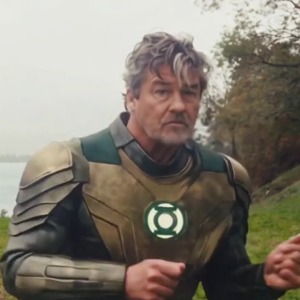
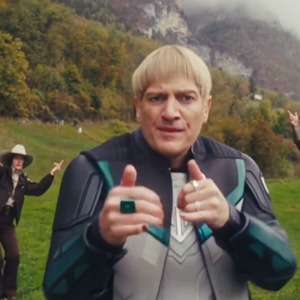
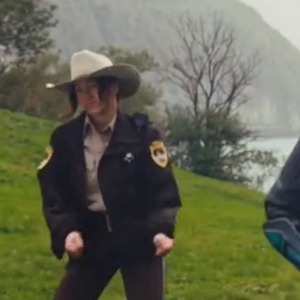
These are screenshots from the selected preview, not customer photos. The numbers match the upload slots below; use your own photos for the final appearance.

Photo 1 — opening front-right lead
Photo 2 — center and close-up
Photo 3 — opening left-background role

Why the smile can feel unfamiliar

A still photo does not specify every expression in a moving performance. The model combines that identity with the selected gestures and mouth movements; an exaggerated smile or changed facial proportions can make a familiar person look different.

That explains a possible generation artifact. It does not tell you how any particular creator made a TikTok clip.

Choose photos that show the face clearly

Use a sharp, well-lit photo with the face unobstructed and the hairstyle visible. Avoid heavy beauty filters, sunglasses and a tiny face inside a group shot.

Put the photo you want in the center close-up in slot 2. A better source photo gives clearer identity information, but does not guarantee a natural smile or exact expression.

Check hair, clothes and hands as well as the lead

Watch the full result, including the small rear-left dancer. Check for source hair or clothing carrying through, changing faces across cuts, altered fingers and distracting accessories.

The prepared tool does not offer a custom expression or lip-sync selector. Manual partial edits are available by contacting Memelry; ask about eligibility, scope and cost before arranging an edit.

Is a realistic-looking clip proof that it happened?

No. Memelry’s photo-to-video results are generated media. The documented human Swiss Side Quest performance and AI-character interpretations are separate videos. Use the source guide to distinguish them.

Last checked .

How do you start making your Wassup in a Minute AI AI video?

You can start this AI video by uploading clear, separate photos into the generator below, choosing the intended person for each available photo slot.

See the Wassup in a Minute AI AI generator and example

One clear photo per person, face visible. Only photo 1 is required; anyone without a photo stays as in the original clip. JPG, PNG or WebP, up to 10 MB each.

Already have credits?

This video uses 14 credits. Sign in with your checkout email to use your balance.

No account needed: pay $13.99 once and your video starts. Signed in with credits? It uses 14 credits instead.

Already paid? Use your checkout email to recover your credits. Sign in to use your credits.

Generation failures and moderation refusals return the used generation credits automatically. A credit return is separate from a refund to your payment card. Refund policy

Photo requirements

  • Use: One person or one pet, alone in the photo
  • Use: Face clear and facing the camera
  • Use: Even light, sharp, no heavy filters
  • Avoid: Group photos, tiny or cut-off faces
  • Avoid: Sunglasses, masks or hands over the face
  • Avoid: Anyone under 18

JPG, PNG or WebP, up to 10 MB. Uploaded photos are stored to provide the service. Delete your account or contact support to request deletion.

Output
Length
about 14 seconds
Quality
720p (1280×720)
Model
Seedance 2.5
Format
16:9 horizontal MP4
Sound
The original clip's sound
Ready in
5–10 minutes
Cost
$13.99 per video, or 14 credits if you have a pack

Effect reference

14s · 720p · 16:9 horizontal · MP4 with the original sound

Who would you put in this video?

Send this template to a friend and choose your roles. The link shares this public page.

What else do people ask about Wassup in a Minute AI?

People ask about photos, performer choices, payment, music and downloads; the answers below explain the available options and requirements for the page you are viewing.

+Can I choose a different smile in this form?

The prepared form has no custom expression selector. Photos guide appearance and the reference guides the intended performance.

+Will a clearer photo guarantee a perfect likeness?

No. It improves the available identity information; generated faces and details can still vary.

+Can the small background dancer look wrong even if the lead looks right?

Yes. Inspect all three performers and every camera cut, not only the center close-up.

+What does this video cost?

$13.99 before applicable tax. One-time payment. No monthly subscription. The full prepared video includes its available photo roles. The displayed effect preview is not a free personalized trial.

Can't find your meme? Paste the TikTok link →Send any meme video and your photos; we put your faces and clothes into it.