Skip to content

Can I put the same person in all three Wassup roles?

To request the same person in all three Wassup roles, select that person’s photo separately in each of the three upload slots. One filled slot alone replaces only its assigned performer. $13.99 before applicable tax. One-time payment. No monthly subscription.

Make the Wassup video

14 seconds · 720p · 16:9 · reference sound · $13.99 before applicable tax. One-time payment. No monthly subscription.

Photo preparation and full tutorial

Match the reference roles to your photos

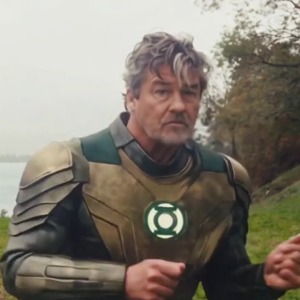
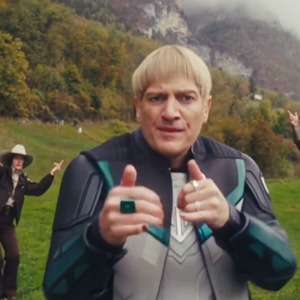
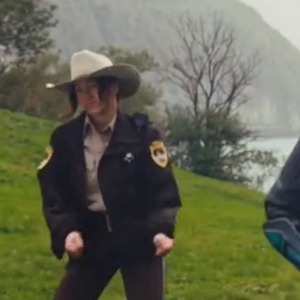
These are screenshots from the selected preview, not customer photos. The numbers match the upload slots below; use your own photos for the final appearance.

Photo 1 — opening front-right lead
Photo 2 — center and close-up
Photo 3 — opening left-background role

One upload is different from three role assignments

The form handles each role independently. Choose the same clear one-person image in photo 1, photo 2 and photo 3 to request that appearance in all three tracks. Selecting it for one role does not automatically fill the others.

You can also provide different clear photos of the same consenting person, but differences in hair, lighting and clothes give the model different appearance cues.

Keep three separate dancers in the scene

The request is for three performers sharing one photo identity, not a single body stretched across the screen. Each follows its own reference role: front-right lead, center close-up and left-background dancer.

This uses the existing three photo slots. There is no automatic clone button, and no claim that three generated faces will match perfectly in every frame.

Inspect the result across camera cuts

Look at both the large center close-up and the small rear-left performer. Facial proportions, hairstyle and clothing can drift between shots, particularly for background figures.

If you want three distinct friends instead, use a different person in each slot. If you want only the opening lead replaced, fill photo 1 and leave the optional roles empty.

Last checked .

How do you start making your Wassup in a Minute AI AI video?

You can start this AI video by uploading clear, separate photos into the generator below, choosing the intended person for each available photo slot.

See the Wassup in a Minute AI AI generator and example

One clear photo per person, face visible. Only photo 1 is required; anyone without a photo stays as in the original clip. JPG, PNG or WebP, up to 10 MB each.

Already have credits?

This video uses 14 credits. Sign in with your checkout email to use your balance.

No account needed: pay $13.99 once and your video starts. Signed in with credits? It uses 14 credits instead.

Already paid? Use your checkout email to recover your credits. Sign in to use your credits.

Generation failures and moderation refusals return the used generation credits automatically. A credit return is separate from a refund to your payment card. Refund policy

Photo requirements

  • Use: One person or one pet, alone in the photo
  • Use: Face clear and facing the camera
  • Use: Even light, sharp, no heavy filters
  • Avoid: Group photos, tiny or cut-off faces
  • Avoid: Sunglasses, masks or hands over the face
  • Avoid: Anyone under 18

JPG, PNG or WebP, up to 10 MB. Uploaded photos are stored to provide the service. Delete your account or contact support to request deletion.

Output
Length
about 14 seconds
Quality
720p (1280×720)
Model
Seedance 2.5
Format
16:9 horizontal MP4
Sound
The original clip's sound
Ready in
5–10 minutes
Cost
$13.99 per video, or 14 credits if you have a pack

Effect reference

14s · 720p · 16:9 horizontal · MP4 with the original sound

Who would you put in this video?

Send this template to a friend and choose your roles. The link shares this public page.

What else do people ask about Wassup in a Minute AI?

People ask about photos, performer choices, payment, music and downloads; the answers below explain the available options and requirements for the page you are viewing.

+Does one photo automatically turn into three copies of me?

No. Select the photo independently in all three slots to request the same person in every role.

+Can I select the same image file more than once?

The form accepts a separate image selection for each role, including the same file. This is an input workflow, not a guarantee of identical generated copies.

+Do three assignments triple the price?

No. You purchase one selected video, which has three available photo roles.

+What does this video cost?

$13.99 before applicable tax. One-time payment. No monthly subscription. The full prepared video includes its available photo roles. The displayed effect preview is not a free personalized trial.

Can't find your meme? Paste the TikTok link →Send any meme video and your photos; we put your faces and clothes into it.