Skip to content

Boom Clap Confetti AI Video

Upload one photo to replace the singer in the indoor confetti cannon version. Get a 12-second vertical 720p MP4 with the reference audio. $11.99 before applicable tax. One-time payment. No monthly subscription.

Choose your photo

$11.99 before applicable tax. One-time payment. No monthly subscription.

Match the reference roles to your photos

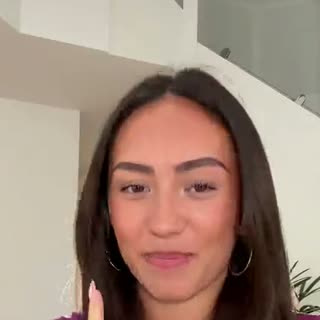
These are screenshots from the selected preview, not customer photos. The numbers match the upload slots below; use your own photos for the final appearance.

Confetti singer
Confetti singer

No account needed: pay $11.99 once and your video starts. Signed in with credits? It uses 12 credits instead.

Already have credits?

This video uses 12 credits. Sign in with your checkout email to use your balance.

Already paid? Use your checkout email to recover your credits. Sign in to use your credits.

Generation failures and moderation refusals return the used generation credits automatically. A credit return is separate from a refund to your payment card. Refund policy

Photo requirements

  • Use: One person or one pet, alone in the photo
  • Use: Face clear and facing the camera
  • Use: Even light, sharp, no heavy filters
  • Avoid: Group photos, tiny or cut-off faces
  • Avoid: Sunglasses, masks or hands over the face
  • Avoid: Anyone under 18

JPG, PNG or WebP, up to 10 MB. Uploaded photos are stored to provide the service. Delete your account or contact support to request deletion.

Output
Length
about 12 seconds
Quality
720p (720×1280)
Model
Seedance 2.5
Format
9:16 vertical MP4
Sound
The original clip's sound
Ready in
5–10 minutes
Cost
$11.99 per video, or 12 credits if you have a pack

Effect reference (not a Memelry-generated result)

12s · 720p · 9:16 vertical · MP4 with the original sound

Who would you put in this video?

Send this template to a friend and choose your roles. The link shares this public page.

How does it work, step by step?

Choose the photos for your selected template, complete checkout, then download the finished MP4 after generation; the steps below explain what to prepare.

  1. Watch the indoor version. Play the reference to see the two confetti bursts and hear the chorus.
  2. Choose the singer. Choose one sharp, front-facing portrait with your face and shoulders visible. Both confetti bursts use the same photo.
  3. Make and download your video. Pay once or use existing credits. Download the finished MP4 from your history.

What happens on each “boom”?

In the @cadelandmia clip, the singer faces the phone and makes a heart with her hands. The first blast sends white confetti through the room. She keeps singing, so the second blast catches her on camera again, this time in a shower of gold.

The template follows that indoor performance to the chorus of Boom Clap by Charli XCX. You supply the singer’s portrait. The hand gestures, confetti timing and camera framing come from the clip.

Where can you check the original videos and sources?

The sources linked below document the selected reference clips and their context; template examples show reference footage unless explicitly labeled as generated results.

Last checked .

What else do people ask about Boom Clap Confetti?

People ask about photos, performer choices, payment, music and downloads; the answers below explain the available options and requirements for the page you are viewing.

+Do I need to film myself singing?

One portrait is enough. The reference supplies the lip movements, music and confetti.

+Is this the rooftop glitter version?

This template uses the indoor clip with white and gold confetti. The singer stays in the same room throughout.

+How long is the finished video?

The download is a 12-second vertical MP4 in 720p with the reference audio. $11.99 before applicable tax. One-time payment. No monthly subscription.

+Do I need to film a confetti pop or line it up with the song?

One front-facing photo is enough. The indoor reference supplies the performance, both confetti bursts and their timing with the song. Play the preview with sound before choosing your photo.

Can't find your meme? Paste the TikTok link →Send any meme video and your photos; we put your faces and clothes into it.